In this module
Module 1 · Lesson 1.4 · [CORE] · From Idea to First Paying Customer
Input: a live landing page with Clarity + GA4 - the session-replay and visitor-count trackers - installed (from Lesson 1.3)
Output: a go / iterate / kill decision on your hypothesis, backed by real demand signal
Progress: M1 · 4 of 5
You have a live page and tracking installed. Now you need cold strangers to see it - people with no reason to be polite to you, which rules out friends and your LinkedIn network. A stranger who hands over an email address is voting with something real; a friend saying “sounds great” is voting with kindness.
Pick your channel #
Choose based on who your hypothesis names in the [CUSTOMER] blank. The dollar ranges below are CPC (cost-per-click - what one ad click costs you):
- Selling to individual people → Meta Ads ($0.70-$1.90 CPC). Best when the product is visual and the audience is broad.
- Selling to businesses, by job title → Google Search ($3-$8 CPC) if your customer Googles the problem; LinkedIn ($5.70-$22 CPC) if they don’t.
- Developer tools → Reddit Ads ($1.25-$3 CPC) in r/programming, r/webdev, r/SaaS.
- Niche vertical → Google Search long-tail ($1-$5 CPC) - real estate, dentists, contractors Googling pain.
Set your budget #
Two routes get you 300 cold visitors: the $0 organic path on the full channel guide - costs time instead of money, slower but real - or paid ads, done in 5-7 days. Pick by which you have more of this month, time or budget. If you’re paying:
Budget: your channel’s CPC × 300 visits, plus ~20% slack for ad iterations. On Meta that’s $210-$570 in clicks - plan $250-$700 total; on LinkedIn, $1,650-$6,600 before slack.
Start ad-account setup 2-3 days before launch. First-time ad accounts can take 24-72 hours to approve. Meta is the slowest; Reddit clears same-day.
You will not have to figure out the ad on your own: the launch checklist below links a step-by-step recipe for your channel (7 settings, click by click) plus a copy-paste prompt that writes the ad copy and image concept for you.
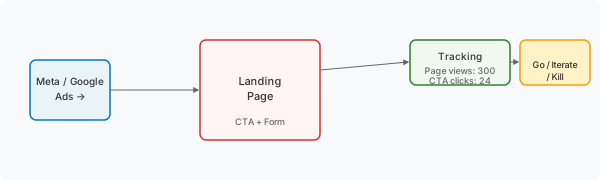
Launch and read the signal #
Launch:
- Install your channel’s pixel. A pixel is the ad platform’s own tracking snippet - it tells the platform which ad clicks turned into signups, so it can find you more of those people and show you cost-per-signup. It reports to the AD PLATFORM; the GA4 you installed in 1.3 reports to YOU. Open your ad platform’s pixel manager: Meta → Events Manager, LinkedIn → Campaign Manager, Reddit → Ads Manager. Copy the pixel snippet, paste in your page builder’s head-tag field - same 60-second process as Clarity and GA4 in Lesson 1.3. Open your page in an incognito window; verify the pixel fires in your platform’s dashboard. Google Ads users: skip this (GA4 links directly and acts as your pixel).
- Verify your ad account is approved and payment method attached. If not, set it up tonight.
- Create and launch your campaign. Open the campaign creation recipe for your channel (Meta, Google, LinkedIn, or Reddit). Each recipe walks you through 7 settings: objective, budget, audience, placement, creative, tracking, and launch. Set a daily budget that gets you to 300 visits within 5-7 days.
- Do not touch the page. Resist headline rewrites, bid adjustments, and hourly dashboard refreshes for the full run. You want raw demand against the original hypothesis - not an optimized funnel.
- After 300 visits, work out your conversion rate (form submits ÷ visits that came from your ad campaign - use the campaign’s landing-page-view count, not GA4’s total page views, so friends and your own refreshes don’t dilute the number) and find it on the meter above. The same bands, with the action for each:
| Conversion rate from cold traffic | Decision | What to do |
|---|---|---|
| Under 3% | Kill or pivot | Hypothesis is wrong. Rewrite the weakest blank and re-test. |
| 3-6% | Iterate the message | Rewrite headline or try a different audience. Same hypothesis, different framing. |
| 6-10% | Promising | Finish 1.5 · the price test, then start Module 2 interviews - the people who signed up go on your interview list. |
| 10-20% | Strong signal | Run interviews + Product Brief in parallel. |
| Over 20% | Suspicious | Either hot market OR broken targeting. Verify with a second channel. |
On a boundary (exactly 6%, 10%, or 20%)? Take the higher band’s action.
Success check: you have a conversion rate from ≥300 cold visits AND a go/iterate/kill decision written down.
While the 5-7 days pass #
The ads run for 5-7 days before 300 visits land. Camping on the dashboard won’t speed it up, and the number means nothing until the traffic is in. Use the wait to get a head start on Module 2.
In Lesson 2.3 you’ll need a list of 30 people who have posted about the problem your page names - that list is what makes the interview outreach work. Start it now, in one sitting:
- Open a spreadsheet.
- Write down 10-15 names you have seen complain about this problem - in a subreddit (a Reddit topic forum), a Slack group, wherever your customer hangs out.
- Paste the exact post next to each name.
If your conversion comes back under 3%, you’ll re-aim this list at the tightened hypothesis - the names still cost little. Above that, it’s ready as-is, and Module 2 opens with its first task already half-done.
Come back when your campaign dashboard shows 300 landing-page views. That is the wait over: read your conversion rate against the meter above, then start the price test.
If the number looks wrong #
If this fails: conversion is below 3%.
- Why: your
[CUSTOMER]or[DIFFERENTIATION]blank is too vague - strangers don’t recognize themselves in the headline. - Fix: go back to Lesson 1.1 and tighten the blank that scored lowest on your 4-lens test.
If this fails: conversion is above 20%.
- Why: either you have a hot market (rare) or your ad targeting is too narrow (common).
- Fix: run a second channel briefly. LinkedIn 22% + Reddit 3% = your LinkedIn targeting is the variable, not the hypothesis. Both channels near the rate = the signal is real.
When you read the results, notice which number surprised you most - surprise means the data disagreed with something you believed, and whichever hypothesis blank produced that belief is the one worth testing first in Module 2. Open your Founding Hypothesis doc and check it against the blank you flagged as your riskiest assumption in 1.1: if the surprise landed on that same blank, your instinct was calibrated; if it landed somewhere else, update the flag - Module 2 interviews should chase the new one.
Done: ≥300 cold visitors have seen your page and you have a conversion rate read against the go/iterate/kill table. Decision written down.
You have now: Founding Hypothesis (1.1) + clear landing page (1.2) + tracking (1.3) + cold-traffic data + a go / iterate / kill decision + a waitlist email list in your page builder (typically 15-50 signups - Module 2 interviews and Module 5 invites draw from it). Price test is next.
Next: 1.5 · Price Your Hypothesis on the Smoke-Test Page - adds a Stripe button so you can find out if strangers will pay, not just sign up.
If blocked: see “If this fails” above. If the ad budget is out of reach, use the $0 organic path on the full channel guide - slower but real.
Deeper reference: Full channel budgets + campaign creation recipes + pixel install + ad account setup timing + B2B budget alternatives
See it in action: Module 1 walkthrough: Mia builds TutorMatch
Built by JetThoughts as part of the From Idea to First Paying Customer free curriculum.