In this module
Module 2 · Lesson 2.3 · [CORE] · From Idea to First Paying Customer
Input: a hypothesis you suspect is real (from Lesson 1.1) + a sharpened Mom Test question list (built in Lesson 2.1, polished in Lesson 2.2)
Output: a 30-name list of specific people you can name because you read what they wrote, ready for the outreach templates in Lesson 2.4
Progress: M2 · 3 of 6
Your LinkedIn network is the comfortable place to start - and it books polite calls with old colleagues being nice, not interviews with strangers who live the problem. The technique below replaces it: read where strangers already complain about your exact problem, then write back to those specific complainers. Same hypothesis, same hours, different place to look - and it fills a calendar with 10+ booked interviews instead of 2-3 polite ones.
The full journey, top to bottom - this page covers the first three steps (map, read, list); Part 2 covers writing to each person and booking the 10 calls:
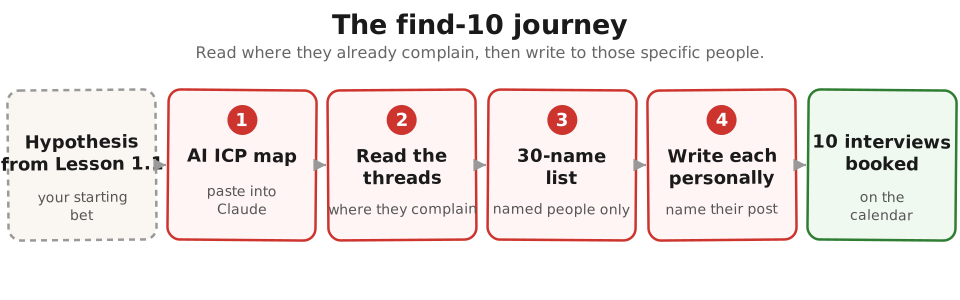
Calendar reality + smoke-test gate before you start. Full-time founder typically books 10 interviews across 2-4 calendar weeks; evening-only founder (2-4 hr/week) typically needs 6-8 calendar weeks - plan around the longer version. Your Lesson 1.2-1.4 smoke test should have cleared roughly 6%+ email conversion (the “Promising” band) or 5%+ Stripe-click on the Lesson 1.5 price-button variant. 3-6% is the “iterate the message” zone, not a green light. Below 3% means you have a demand-side problem - go back to Lesson 1.1 and rewrite the weakest blank before booking interviews.
One time-box: if you catch yourself on day three still polishing the list instead of moving to outreach, stop - 25 good rows now beat 30 perfect rows next week.
Before you start: write three sentences #
Started a few rows during the Lesson 1.4 wait? Pick up from those. These are not new homework - they are your 1.1 Founding Hypothesis blanks, unpacked for people-hunting. Open your Founding Hypothesis doc, copy the sentence in, and expand two of its blanks into full sentences (the third - Business - is the one genuinely new line). Without them, every interview answer sounds encouraging and you can’t tell confirm from kill:
| Profile | What to write | Bad vs Good |
|---|---|---|
| Customer (one sentence) | Your [CUSTOMER] blank, expanded: who is this person in real-world detail - role, company size, the moment in their week when the pain happens. (If you ran the optional Lesson 2.2 persona rehearsal you already sketched role/industry/size - reuse it here.) | Bad: “small-business owners” Good: “a 12-person law-firm office manager on Friday afternoon trying to invoice ten clients before Quickbooks logs her out” |
| Business (one sentence) | The one line your hypothesis doesn’t carry: what kind of business are you building? B2B SaaS, B2B services, B2C app, marketplace. Free or paid. Self-serve or sales-led. | Bad: “a SaaS tool” Good: “B2B SaaS, self-serve, $29-49/month annual billing” |
| Solution (one sentence) | Your [APPROACH] blank, rewritten as the change it makes. You won’t pitch this in calls, but you need it written down to know which conversations confirm or kill it. | Bad: “a tool that automates invoicing” Good: “I think a one-click invoice export to Stripe and Wave saves the office manager 90 minutes every Friday” |
If you can’t write all three on a single napkin, do that first.
Translate the hypothesis into an ICP map #
The 2026 shortcut: AI does the part that used to take a week of research. You hand it your three sentences plus two competitor URLs; it returns the ICP profile (ICP = Ideal Customer Profile - the specific kind of person your hypothesis’s [CUSTOMER] blank names), the exact places those people post, and the search strings to find named individuals.
Ran the Lesson 1.2 research prompt? Paste 2-3 of those sourced complaints into the prompt as seed pains - they sharpen the search strings better than the hypothesis alone.
Paste this prompt into Claude or ChatGPT:
You are helping me find the first 10 customer interviews for a product I'm validating.

My hypothesis (3 sentences):
- Customer: [paste your customer sentence]
- Business: [paste your business sentence]
- Solution: [paste your solution sentence]

Two competitors or adjacent products serving a similar customer
(start from the `[COMPETITION]` blank in your 1.1 hypothesis - what
your customer uses today):
- [COMPETITOR_1_URL]
- [COMPETITOR_2_URL]

Seed pains from real posts (optional, from your Lesson 1.2 research):
- "[CUSTOMER_QUOTE]"
- "[CUSTOMER_QUOTE]"

Return:
1. A sharper ICP profile (role, industry, company size, the moment in their week when the pain happens, one quote in their language).
2. 8 subreddits, Slack/Discord communities, and forums where this person posts. For each, give the community's topic focus, typical post frequency (e.g., "20 new posts/day" or "2-3 per week"), and 2-3 short keyword phrases that come up most often. Do NOT generate URLs - you cannot browse the web. I will verify the community myself with these inputs.
3. 5 Google + LinkedIn search strings I can paste in today to find named people complaining about this problem (use `site:`, quotes, and `intext:` where helpful).
4. 5 second-degree adjacent search terms I might miss (workarounds they use, related complaints, tool names they'd mention while frustrated).

If you cannot describe a real community for any item, respond with "NOT FOUND - [ITEM]" rather than guessing.
No competitor URLs yet? Ask Claude or ChatGPT to name 3-5 competitors for your one-sentence hypothesis, or Google your problem in plain words plus
toolorsoftwareand grab the top 2 results that aren’t blog posts.
If a community the AI proposes is dead or off-topic, drop it and ask: Suggest 3 alternatives more focused on [VERTICAL].
Read where they’re already complaining #
Ran the research prompt back in Lesson 1.2? Then you’ve skimmed these places once already - but that pass collected phrases for your landing page. This pass collects the named people behind the complaints: every quote you keep now comes with a username and a URL, because these are the people you’ll message in 2.4. Start with the threads Perplexity already found for you.
The simplest way:
- Open one of the channels the AI proposed in the ICP map.
- In the search bar, paste the exact problem phrase in quotes (e.g.
"invoicing takes forever"). - Sort by Top → Past Month. Read the top 30 results.
- Open a Google Doc. Each time a complaint matches your hypothesis, copy the sentence verbatim - with the username and URL.
- Repeat for two more channels.
When you’re done you should have 30 real sentences and 30 named people. Don’t paraphrase - the exact wording is the point, and it becomes your subject lines in Part 2. The per-channel walk (Reddit, LinkedIn, G2, Slack, Twitter, personal network), the Reddit karma rules, and the keyword-variation gallery live in the full reference.
Watch for the echo chamber. If your list starts filling with friends and fellow founders from startup communities, stop and go back to the search strings. People who know you will say the idea sounds great, because being nice costs them nothing. A real signal comes from a stranger who describes the problem in their own words and has no reason to spare your feelings.
Build a list of 30 specific people #
Turn the 30 sentences into 30 names. Open each thread you saved, click each useful username, and copy four things into a spreadsheet: Name (theirs, not their company), role + company (one cell), the post you’ll reference (paste the URL), and one specific line they wrote (the phrase you’ll quote back).
Your Lesson 1.2 complaints each came with a thread URL - those posters are named leads with a known pain; enter them as the first rows (name, post URL, quoted line).
This is the most important step in the lesson. A list of 30 individuals you can name - because you read what they wrote - replies far more often than a list of strangers a tool exported for you - the quoted line is the difference. Aim for 30 hand-picked people in one focused sitting, then filter the list on six dimensions (buyer-or-user, company size, one industry, one timezone) so the calls are bookable.
Save the Apollo filter and whatever contacts your monthly export credits cover (a small monthly allowance on the free tier) to a tab named “Module 5 cold seed” in your outreach spreadsheet. You will reuse this exact filter in Lesson 5.7 cold outbound.
Success check: pick three rows at random. Each has all four cells filled, the post URL opens, and the quoted line is their wording, not your paraphrase. If all three rows pass, the list is ready for Part 2.
If this fails: an hour of searching turns up 3 names, not 30.
- Why: you’re searching in your product words; the people you’re looking for complain in their workaround words.
- Fix: search a related keyword (“boarding costs” instead of “pet sitter”) - 30 minutes of keyword variation turns 3 names into 12.
Done: 30-name list is built in your spreadsheet with name, role+company, post URL, and one quoted line per row.
You have now: a question list (2.1-2.2) + a 30-name list of real people (2.3). Outreach is next.
Next: 2.4 · Find 10 People: What to Say - the message templates, cadence, and follow-up sequence for the list you just built.
If blocked: see “If this fails” above. If the AI returned “NOT FOUND” for every community, your hypothesis is too vague. Go back to Lesson 1.1 and rewrite the customer sentence with a specific role, company size, and the moment in their week when the pain happens.
Deeper reference: Full channel walk + search-string galleries + list filters + Apollo backfill + monitoring tools + offline-vertical panels
See it in action: Module 2 walkthrough: Mia interviews ten parents
Built by JetThoughts as part of the From Idea to First Paying Customer curriculum.