In this module
Module 1 · Lesson 1.2 · [CORE] · From Idea to First Paying Customer
Input: your Founding Hypothesis sentence from Lesson 1.1 (the one-sentence
if [CUSTOMER] solves [PROBLEM] with [APPROACH]...you wrote)Output: a live landing page that explains your offer to potential customers
Progress: M1 · 2 of 5
“Just validate it” is the advice everyone gives without showing the how. This lesson turns your hypothesis into a landing page that does the explaining - so strangers get your idea without you in the room.
What the page is made of #
A smoke-test page is one URL that describes your unbuilt product and asks visitors for an email if they want it. This lesson builds the page so strangers can understand it. Tracking goes in 1.3; the demand test runs in 1.4 (would strangers actually sign up?).
An AI page builder drafts a working page from your hypothesis in ~60 seconds. This lesson uses Mixo (fastest setup); most AI page builders are interchangeable for this workflow.
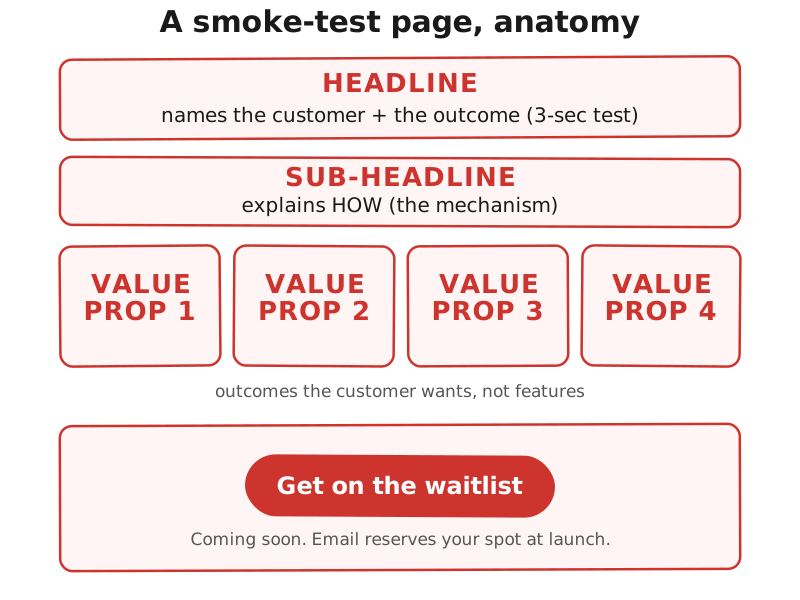
The page has four copy blocks that decide whether it converts:
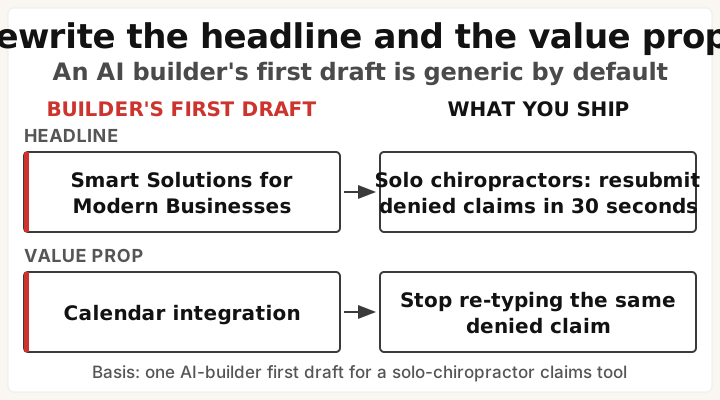
- The headline names the customer and the outcome in one line. “Solo chiropractors: resubmit denied claims in 30 seconds” works because a visitor knows in 3 seconds whether the page is for them. “Smart Solutions for Modern Businesses” tells them nothing.
- The sub-headline explains how, in one line. The mechanism. “One click submits to your insurance portal” beats “AI-powered automation.”
- The 3-4 value props describe what the visitor gets, in their words. “Stop calling 8 tutoring centers” is an outcome a parent wants; “Calendar integration” is a feature they read as noise.
- The CTA + footer is “Get on the waitlist” plus a “Coming soon” line in the footer. (CTA = call to action, the button you want the visitor to click.) Never use “Buy now” on this page: selling something that does not exist yet without saying so is false advertising. Lesson 1.5 adds a price test the honest way - a clearly labeled founding-member pre-order with a visible refund promise.
Step 1: get 2-3 real customer quotes (10 minutes) #
The builder prompt in Step 2 has three slots for your customers’ own words. They become your value props, and they are what makes the page sound like your customer instead of like marketing.
| Where you are | What to do |
|---|---|
| No quotes yet (expected at this stage) | Run the prompt below in Perplexity or any AI search engine, keep the best 2-3 lines - and keep the source URLs, because Lesson 2.3 reads these same threads to find the named people you’ll interview |
| Already have real quotes from conversations | Skip straight to Step 2 |
| Already ran the full hypothesis sprint research pass | Reuse those quotes - don’t search twice |
Find real, verbatim complaints from [CUSTOMER] about [PROBLEM].
Search Reddit, G2, Trustpilot, and niche forums. For each result, give me:
- the exact quote, in the person's own words
- a link to the source

Return 5-8 quotes. Prefer recent posts and specific frustration over
general opinions.
(These same quotes get reused later: your [PROBLEM] blank in 1.1 if it’s still vague, and Module 2’s people-hunting starts from the threads this search finds.)
Step 2: the prompt to paste #
Most builders ask you to “describe your idea” and then guess the rest of the page. Don’t make them guess. Paste the prompt below instead - it hands the builder your hypothesis, the four blocks above, and the quotes from Step 1, so the first draft comes back close. The same prompt works in Mixo, Carrd, or any AI builder. Fill the [...] slots from your Lesson 1.1 Founding Hypothesis; leave the last two lines exactly as written (they’re the parts AI builders skip on their own).
Build a landing page for a product that isn't built yet. Use exactly these
blocks, in this order:
- Hero headline: names the customer and the outcome in one line
- Sub-headline: one line explaining how it works (the mechanism)
- 3-4 value props: what the visitor gets, in their own words, max 6 words each
- Call-to-action button, labeled: Get on the waitlist
- Footer line: Coming soon. Email reserves your spot at launch.

Here is the product:
Founding Hypothesis: [PASTE YOUR 1.1 SENTENCE]
Who it's for: [CUSTOMER blank]
The problem they have: [PROBLEM blank]
What they use today instead: [COMPETITION blank]
Why they'd switch: [DIFFERENTIATION blank]

Real customer wording to echo in the value props (keep their words, compress
each to fit the six-word cap - quotes from Step 1):
- "[verbatim customer quote 1]"
- "[verbatim customer quote 2]"
- "[verbatim customer quote 3]"

Before you write, do a quick web search for how [CUSTOMER] describe [PROBLEM]
in their own words, and match their vocabulary. Do NOT invent customer quotes:
if you can't find real phrasing for a value prop, write it plainly and mark
it [NEEDS REAL WORDING] so I can replace it.

The page must pass this test: a stranger can say who it is for and what it does
in 3 seconds. No pricing, no FAQ, no testimonials. Never write "Buy now."
The draft that comes back is a starting point. Two blocks always need your hand on them:
Build the page #
Build:
- Sign up at mixo.io (email only). Paste the Step 2 prompt, click Generate. ~60 seconds.
- Tighten the 4 copy blocks against the draft:
- Headline names customer + outcome.
- Value props rewrite as outcomes (“Stop calling 8 centers,” not “Calendar integration”).
- CTA reads “Get on the waitlist.”
- Footer says “Coming soon. Email reserves your spot at launch.” (AI builders skip this.)
- Strip any Pricing, FAQ, or Testimonials blocks the builder added.
- Value props still read generic? Prompt your AI assistant: “Turn this hypothesis into 3 outcome-focused value props, max 6 words each: [PASTE HYPOTHESIS]” and paste the output into the value-props section.
- Swap the hero image (the main image at the top of your page):
- Ask your AI assistant: “Photorealistic image: [pain scenario in one sentence]. Candid, natural lighting, no text or logos.”
- No image generator? Grab a stock photo from Unsplash.
- In Mixo: click the hero section → Replace image → Upload.
- If the image doesn’t help, delete it - the headline carries the page. Never use a product mockup of something you have not built.
- Click Publish. Mixo gives a URL like
yourname.mixo.io. Open it in an incognito window. Confirm the page loads.- Know where your signups land. Find your builder’s signup list (Mixo: Subscribers tab) - every email the waitlist collects lives there. Don’t export anything yet; just confirm you can see the list. Module 2 interviews and Module 5’s first customers both start from these names.
Test it on one stranger #
Send the URL to ONE real person who has not seen your work. Any stranger works (they don’t need to be your target customer - this tests headline clarity, not buying interest). Ask: “In 3 seconds, who is this page for and what does it do?” Nobody available right now? Record a short screen recording of your page with Loom (a free screen-recording tool) and send it to someone tomorrow with the same 3-second question. Or post the URL in a relevant subreddit with “What does this page do in 3 seconds?”
Good - Success check: they can name both. If they cannot, the headline is almost always the fix - rewrite it and retest.
If strangers can’t name it #
If this fails: strangers cannot name who the page is for or what it does, even after 2 headline rewrites.
- Why: your hypothesis
[CUSTOMER]or[DIFFERENTIATION]blank is still too vague. - Fix: back to Lesson 1.1 and tighten (“solo chiropractors,” not “small businesses”).
If this fails: the builder’s draft reads generic after 2 regenerations.
- Why: your hypothesis
[PROBLEM]blank is too vague. - Fix: back to Lesson 1.1 and tighten the
[PROBLEM]blank to one specific failure mode.
If this fails: no AI builder fits your idea, or you want manual layout control.
- Why: AI builders rely on common templates; niche layouts and technical product diagrams sometimes don’t fit.
- Fix: drop to manual mode with Carrd (no-code drag-drop). Use the same workflow but write each copy block yourself first. The Step 2 builder prompt works in Carrd’s AI assistant too - paste it there instead of writing from scratch.
Read your published page out loud as if you were the visitor. The sentence where your tongue trips is the next one to rewrite before Lesson 1.3.
Done: your URL is live and one stranger named who it’s for and what it does in 3 seconds.
You have now: Founding Hypothesis (1.1) + a clear landing page (1.2). Demand is the next test.
Next: 1.3 · Wire Tracking Before Traffic Starts - installs tracking on the URL you just built, so you can see what visitors do once traffic starts.
If blocked: see “If this fails” above.
See it in action: Module 1 walkthrough: Mia builds TutorMatch
Built by JetThoughts as part of the From Idea to First Paying Customer free curriculum.