Reference companion to Lessons 2.3 · Where to Look and 2.4 · What to Say - this page carries the detail both micro-lessons point to: the full channel-by-channel research walk, search-string galleries, list filters, the bad-first-draft teardown, the message psychology, the research-panel fallback, and the slow-path variants. Read the micro-lessons first; return here when you need depth on one step.
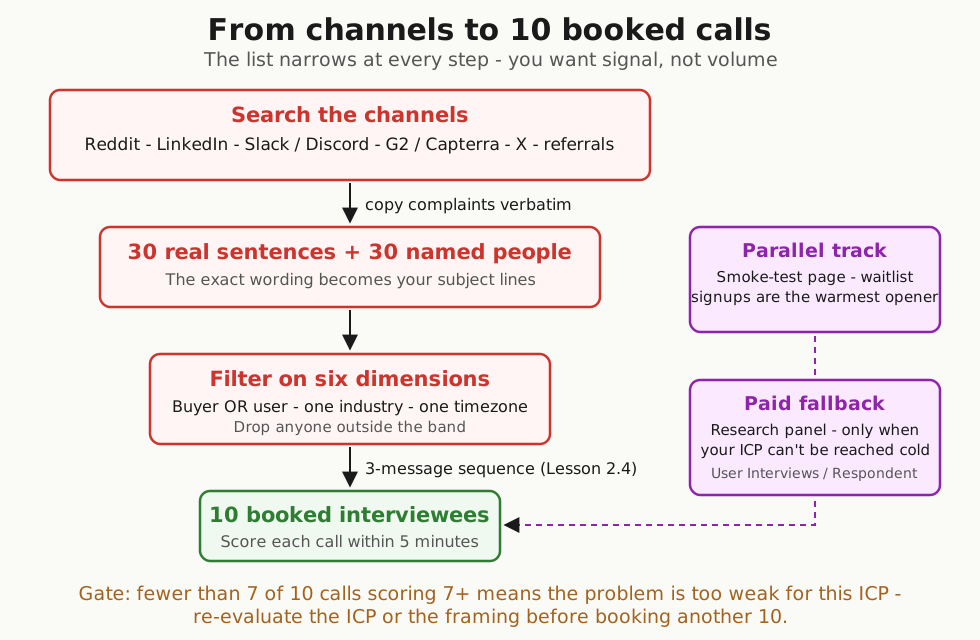
Where to Search: The Full Channel Walk #
The AI ICP map (from Lesson 2.3) names your specific communities. Here is how to work each channel type once you have the list. Read before you write a single message - you are collecting the exact words people use when their problem flares up, because those words become your subject lines in Lesson 2.4.
- Reddit - subreddits in your vertical. Sort by Top -> Past Month. The 1% willing to complain in public are usually willing to take a 20-minute call. Keyworddit surfaces the keywords a given subreddit is currently using, so you can search those phrases back into Reddit and find the named complainers.
- LinkedIn - paste the problem in quotes into search, filter to Posts -> Past Week.
- Industry Slack and Discord - Indie Hackers, Lovable, No Code Founders, and the vertical-specific communities your AI map named.
- G2 and Capterra reviews (the two big business-software review sites) - pull every 2-star and 3-star review of the closest competitor. Pain a stranger typed for free, organized by feature.
- Twitter/X - the 280-character constraint forces complaints to be precise.
- Personal network referrals - text 10 people you know:
Do you know anyone who [PAINFUL_TASK] regularly? Research call, not sales.Warm referrals almost always show - the mutual contact is on the line for it.
One Reddit rule: don’t blast a launch post on day one. Read the sub for a week, leave three real comments, then post a research question. The self-promotion on Reddit guide covers the karma floor and the unwritten rules.
The Simplest Search, Step by Step #
- Open one of the channels the AI proposed in the ICP map.
- In the search bar, paste the exact problem phrase in quotes (e.g.
"invoicing takes forever"). - Sort by Top -> Past Month. Read the top 30 results.
- Open a Google Doc. Each time a complaint matches your hypothesis, copy the sentence verbatim - with the username and URL.
- Repeat for two more channels.
When you’re done you should have 30 real sentences and 30 named people. Don’t paraphrase. The exact wording is the point - that bank is your raw material when you write the cold messages.
If your hypothesis is consumer-facing, swap “Slack/Discord” for TikTok hashtags, Instagram comments, YouTube comment threads, and product subreddits.
Search Strings and Keyword Variation #
When one keyword stops surfacing new people, the fix is a related word, not a paid tool. The second-degree search finds people with the same problem but different vocabulary:
- “boarding costs” instead of “pet sitter”
- “claim denial appeal” instead of “medical billing”
- The workaround they use, the related complaint, the tool name they’d mention while frustrated
Thirty minutes of keyword variation turns 3 names into 12. Ask the AI ICP map for “5 second-degree adjacent search terms I might miss” and run each one back through your top channel.
Filter the List: Six Dimensions #
Once you have named posters in a spreadsheet, filter the final list on six dimensions so the calls are bookable and the signal is clean:
- Buyer OR user - not both
- Company size in your sweet spot (50-500 for most B2B SaaS)
- One industry first - vertical depth beats horizontal spread
- One timezone - so the calls are actually bookable
- The tool you replace or integrate with - filters out the “different problem” lookalikes
- A recent funding or hiring signal - movement = budget = openness
Drop anyone outside the band. You want signal, not volume.
If you run out of named posters before you hit 30, Apollo’s free tier (credit-based, no credit card - a small monthly allowance of email and export credits) lets you filter on role + industry + company size and export the rest. The monthly export allowance is small, so this fills the gap over several weeks, not one sitting. Treat it as backfill, not the source - the hand-picked names always perform better.
Consumer founders - skip the database backfill. Your buyer is on Reddit, Discord, TikTok comments, and Instagram. The hand-picked path is the only one that works for you.
Optional Upgrades to the Research Step #
These are skip-by-default. The main flow works without any of them.
Upgrade the AI ICP map prompt with a deep-research tool. The Claude/ChatGPT version is fast and free; the trade-off is the AI synthesizes text without source links. For a verifiable evidence trail, swap in Perplexity Pro or Gemini Deep Research (both paid tiers) with the same prompt - both return real-source citations for every claim. Spot-check that each proposed community is alive and on-topic before you invest reading time.
Offline-heavy verticals - paid panel as Plan A. If your ICP lives in trades, nursing, in-store retail, elderly users, or regulated B2B, the Reddit / LinkedIn / G2 flow returns nothing useful. UserInterviews and Respondent have screened participants across these verticals; pricing is per completed interview. Decision rule: if your ICP description names an offline trade, an over-60 user, or a regulated profession, budget for a paid panel as Plan A.
Monitoring tools that cut the manual reading load. Keyworddit (no signup) surfaces the high-frequency keywords inside any subreddit. F5Bot sends email alerts when your keywords appear on Reddit, Hacker News, or Lobste.rs. Reddinbox watches Reddit for your keywords and collects the matching conversations in one inbox. These tools surface the threads faster - you still read them yourself.
The Message a First-Time Founder Writes First #
Before the working sequence in Lesson 2.4, look at the version a founder typically sends on attempt one. This is composed from real first-draft messages we’ve seen across projects:
Subject: quick chat?

Hi Marcus,

My name is [your name] and I'm building a tool that helps small-business
owners with invoicing. I'd love 30 minutes of your time to learn more about
your business and see if my product would be a good fit.

Would you be open to a quick chat next week? Calendar is here: [link]

Thanks!
That message gets almost no replies - nothing in it tells the reader why them. Here’s why each sentence dies:
- “quick chat?” subject - generic; competes against every recruiter cold email in their inbox.
- “building a tool that helps small-business owners with invoicing” - pitches a solution to a stranger who didn’t ask.
- “learn more about your business” - vague. They need to know what you’ll do with their 30 minutes.
- “see if my product would be a good fit” - sales language. The reader hears “I’m prospecting,” closes the tab.
- No mention of how you found them. The reader can’t tell whether you’re spamming 500 people or actually paying attention.
The rewrite fixes one thing at a time: subject names the topic they posted about, opening line names the specific post you read, the ask is for 20 minutes of their experience (not their feedback on your idea), and you make it explicit you’re not selling.
The same 3-message pattern works as LinkedIn DMs. The subject becomes the connection-request note. Skip the Day-7 close on LinkedIn - it’s too aggressive in a DM context.
When Cold Outreach Can’t Reach Them: Research Panel #
If your ICP can’t be reached cold - a CFO at a regulated bank, an oncology nurse, a top-100 retailer’s head of operations - cold messages will not work no matter how sharp the opener is. The shortcut: a research panel that pays interviewees for their time.
User Interviews and Respondent are the two big ones. You write a screener, upload the interview script, and they ship booked calls in 3-5 days. Respondent tends to reach business roles (CFOs, engineering directors, ops leads) more reliably; User Interviews has broader consumer coverage.
Everything up to here costs $0 - Gmail and the 30-name list you built in Lesson 2.3. A research panel is the paid shortcut: you pay the service to book interviewees for you, which usually runs a few hundred dollars total for a round of calls. That is why it is not the default - use it only when the cold-outreach path can’t reach your ICP and replies run thin. When it does work, run it in parallel with cold outreach: the two samples bias differently (free-time strangers vs. paid-time strangers), and together they give you a more honest read.
The Parallel Smoke-Test Landing Page #
While the cold-outreach path books the calls, the smoke-test landing page from Lesson 1.4 (built in 1.2) measures whether strangers will give you their email for the thing you described. Run it in parallel and drop the URL into your messages - it doubles as the warmest opener:
“You signed up for the waitlist on [PAGE] last Tuesday - up for a 20-minute call?”
That opener out-performs every cold variant - the person already raised a hand.
Run the cold-outreach track first - that’s where the 10 calls usually come from. Run the smoke-test in parallel because it costs nothing extra. Add the research panel only if your ICP can’t be reached cold.
Slow-Path Variant for the Part-Time Founder #
Working evenings only, with day-job constraints? The staggered cadence in Lesson 2.4 assumes daytime availability. If your only window is one evening block a week, batch-send instead: sort 30 names into priority buckets first, then personalize and send all 30 in one go using Gmail’s multi-send or Streak. Expect a noticeably lower reply rate because the messages land in a burst instead of a stagger - compensate by booking the first 2-3 interviews from your fastest responders quickly.
What Happens After the 10 Calls Are Booked #
Lesson 2.4’s output is 10 booked interviewees. Running them, scoring them, and turning them into the validated problem statement Module 3 needs is a linear sequence:
- Run each interview using the Lesson 2.1 5-question Mom Test technique. Open the Mom Test Interview Script on a second monitor; read the 5 questions verbatim. Plan 20-30 minutes per call.
- Score each call 1-10 within 5 minutes of hanging up per the Lesson 2.1 scoring rubric. Write the score before opening the next browser tab.
- After all 10 calls are done, fill the Validated Problem Statement template using the Mom Test Synthesis page.
- Pick the 5 strongest-signal interviewees (Mom Test score >= 7) for Lesson 2.6 prototype sessions.
- Two artifacts now flow into Module 3 + later modules:
- The Validated Problem Statement (Section 1 of the Lesson 3.1 one-page brief, lifted verbatim)
- The 5 strongest-signal interviewees (Lesson 2.6 input - and later, your Module 5 onramp invitees in Lesson 4.3-4.4, plus your warm-list seed in Lesson 5.3)
If fewer than 7 of 10 calls score >= 7, the problem is too weak for this ICP. Re-evaluate the ICP, the problem framing, or the question wording before booking another 10 calls. The full kill / iterate / proceed decision lives in the Mom Test Synthesis page.
Further Reading #
- Rob Fitzpatrick, The Mom Test (book site) - the past-behavior interview technique you’ll run on every call this list books.
- Y Combinator, Talking to Users (Startup Library) - the canonical YC essay on why this conversation has to happen.
- Teresa Torres, Customer Interviews (Product Talk) - why strangers say yes or no to an interview ask.
- Clay - list enrichment with email verification, useful once you’re past 5 paying customers.
Built by JetThoughts as a companion reference to the From Idea to First Paying Customer free curriculum.