In this module
Module 3 · Lesson 3.1 · [CORE] · From Idea to First Paying Customer
Input: a one-page validated problem statement (from Lesson 2.5 · Mom Test Synthesis, after running interviews in Lesson 2.3 + 2.4) + verbatim “describe in one sentence” vocabulary (from your Lesson 2.6 prototype sessions)
Output: a one-page Product Brief (Vibe PRD) you can hand to Lovable (an AI app builder that turns a plain-English prompt into a working web app) or a hired team
Progress: M3 · 1 of 2
Hand an AI agent or a junior a vague brief and they fill every blank from training data - the busiest big-company version of whatever you half-described. One page, five sections, written in one focused sitting, is how you forbid that before the build starts.
The Product Brief - some founders call it a Vibe PRD (PRD stands for Product Requirements Document) - is one side of paper. It names the user, the problem, the one workflow you are building, the one metric you will measure, and what you are explicitly NOT building.
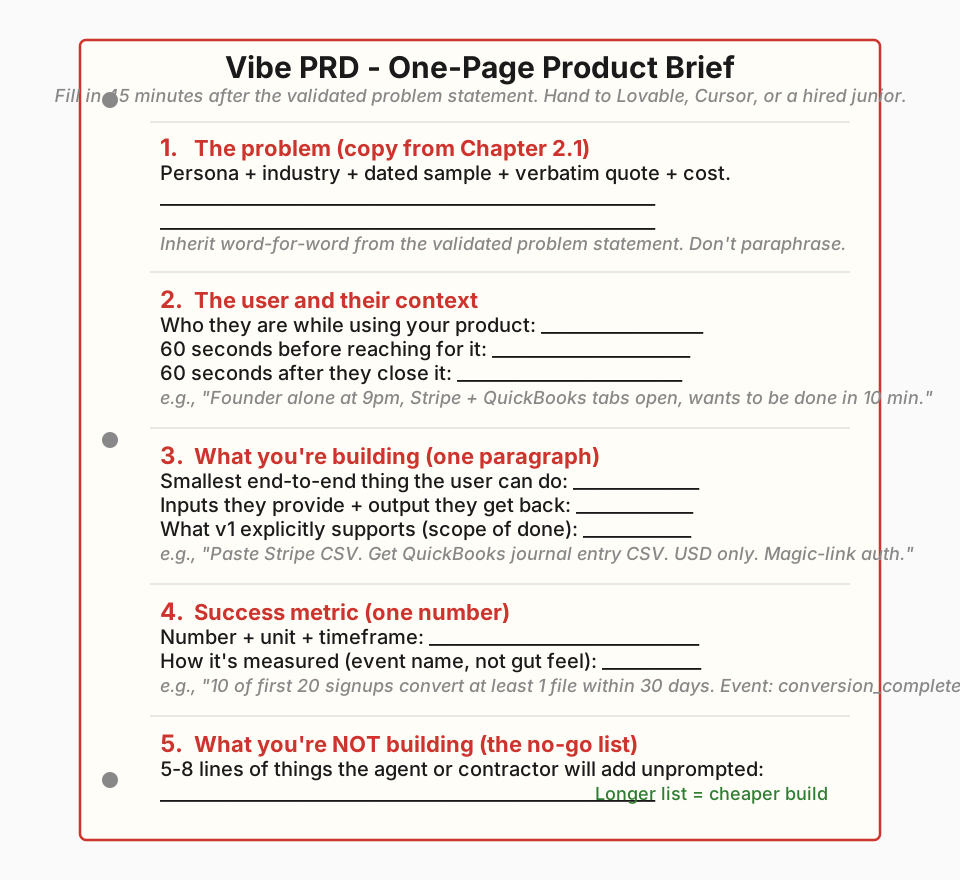
The 5-section template #
Five sections, in this order: problem → user → build → metric → no-go. Every section has a job. Skip one and your prompt or your contractor fills it in for you, usually wrong.
| # | Section | What goes in it |
|---|---|---|
| 1 | The problem | One paragraph copied word-for-word from your Lesson 2.5 validated problem statement. Named persona, dated 10-call sample, one verbatim quote, one quantified cost. |
| 2 | The user and their context | Who the user is while using your product - the 60 seconds before they reach for it and the 60 seconds after. Not their life story. |
| 3 | What you’re building | One plain-English paragraph, verb-led. Names the input the user gives and the output they get back. No feature list. |
| 4 | Success metric | One number, one unit, one timeframe. Measurable inside the app, not from your gut. |
| 5 | What you’re NOT building | 5 to 8 lines naming what a competent agent or junior might add unprompted that you do not want in v1. The longer this list, the cheaper your build. |
Each of the five sections is 2-4 sentences in plain English. Section 5 (the no-go list) is 5-8 bullet lines. Total brief ≤ 250 words on one side of paper. If you spill past 250 words, the persona is too broad or the pain is too vague - revise the section that ran longest first.
Section 1 is inherited, not rewritten. The brief copies your validated problem statement word-for-word. If you find yourself softening the language for “a different document,” you are about to brief a build for a problem you haven’t actually validated. Here is what a good Section 1 looks like, lifted straight from a problem statement:
Pre-seed B2B SaaS founders doing their own Stripe-to-QuickBooks reconciliation lose 6 hours per week and $800 per month in CFO contractor time. 8 of 10 interviewees confirmed (May 2026 sample). One founder said: “Tuesday at 9pm I spent 40 minutes copying Stripe payouts into QuickBooks. I called my CFO. She did it in 90 seconds.”
The Vibe PRD Template is the fillable form - print it and write into the blanks. The full doctrine reference has a worked example and common mistake for all five sections, the choice between a Vibe PRD and a traditional PRD, and when a paid cohort is worth it.
Do this now #
- Block a focused sitting. Open your Validated Problem Statement (Lesson 2.5) and the Vibe PRD Template side by side.
- Copy Section 1 into the brief word-for-word from your problem statement. Do not paraphrase.
- Fill Sections 2-5 from scratch: 2-4 sentences each, Section 5 as 5-8 no-go bullets.
- Read the brief aloud to one peer. Ask: “If you built this in a week using Lovable, what would you build that isn’t on my no-go list?” Their first answer is your missing no-go item - add it to Section 5.
- Paste the finished brief into Lovable, Cursor (an AI coding tool developers run on their own machine), or your contractor’s kickoff doc. Do NOT edit it for the audience - the same one page goes to everyone.
Success check: one page, five sections, Section 1 identical to your validated problem statement, and a no-go list of at least five lines.
If this fails: you can’t fit Section 3 in one paragraph.
- Why: your scope is too big - the brief is trying to be three products at once.
- Fix: pick the single smallest workflow one persona can complete end-to-end, and cut everything else to the no-go list in Section 5.
Skipping the brief and going straight into prompting is the most common way a non-technical founder ends up deep in a working MVP they realise they did not actually want - and into the salvage-or-rebuild question that follows. One focused sitting on this page tonight is what spares you that detour.
Done: all 5 sections of your one-page brief are filled in, Section 1 is copied verbatim from your validated problem statement, and you have read the brief aloud to one peer.
You have now: a validated problem statement (2.5) + prototype vocabulary (2.6) + the one-page Product Brief (3.1). Save it as
Product Brief - [DATE]in yourFounder OSfolder. Section 3 isn’t stress-tested yet - Lesson 3.2 does that before Lovable touches it.Next: 3.2 · Quality-check your brief: features to outcomes - stress-tests Section 3 of the brief you just wrote.
If blocked: see “If this fails” above.
Deeper reference: Full per-section examples, the Vibe-vs-traditional PRD decision, and when a paid cohort is worth it · the fillable Vibe PRD Template
See it in action: Module 3 walkthrough: Mia writes the one-page brief
Built by JetThoughts as part of the From Idea to First Paying Customer curriculum.