Reference companion to Lesson 1.4 · Run the Smoke Test and Read the Signal - this page contains the full channel budget table, ad-account setup timing, B2B budget alternatives, and conversion benchmark sources. Read the micro-lesson first; return here for detailed channel planning.
Full Channel Budget Table #
The dollar cost of 300 visits depends entirely on channel CPC (cost-per-click), with a wide spread. Plan from this table, then add ~20% slack for creative-iteration spend:
| Channel | When to use | 2026 CPC | Budget for 300 visits |
|---|---|---|---|
| Meta / Instagram | Consumer products | $0.70-$1.90 | $210-$570 |
| Reddit Ads | Developer tools, niche communities | $1.25-$3.00 | $375-$900 |
| Google Search | B2B with named search intent | $3-$8 | $900-$2,400 |
| B2B sold by job title | $5.70-$22 | $1,650-$6,600 |
Sources: WordStream Meta benchmarks 2026; WordStream Google Ads benchmarks 2026; The B2B House LinkedIn benchmarks 2026; Stackmatix Reddit Ads 2026.
Default if your budget is tight: the $0 organic path. Use Reddit comment outreach + LinkedIn DMs against the page you built in Lesson 1.2 (Clarity is already installed from 1.3), and run the smoke test slower. The table above is a menu of paid options if you have budget to spare; it is NOT a floor.
Ad-Account Setup Timing #
Picking the channel takes minutes; getting the ad account approved and ready to run is what eats the calendar. First-time ad-account setup runs 60-120 minutes, and many platforms hold the first ad in review for 24-48 hours before approving the account:
- Meta: Business verification + ad account creation + payment method review. Plan for Sunday evening setup so verification clears by Tuesday. Meta is the slowest.
- LinkedIn: First-time advertiser verification can take 48-72 hours.
- Reddit Ads: Usually clears same-day.
- Google Ads: Typically 24 hours for first-time account review.
Plan for the worst case. If you wait until Monday morning to start the account, your “launch this week” plan slips to next week.
B2B on a Small Budget #
If your ideal customer profile (ICP) says LinkedIn but $1,800+ is out of reach, three viable substitutes - two free, one at a fraction of the cost:
| Alternative | How | Cost |
|---|---|---|
| LinkedIn organic outreach | 30 hand-picked DMs to people matching your ICP exactly | Free (trades cash for your time) |
| Reddit Ads in a B2B subreddit | r/SaaS, r/startups, r/Entrepreneur, r/Sysadmin, or your vertical’s sub | $400-$900 for 300 visits |
| Cold email to 50 hand-built leads | Apollo free tier + Gmail | Free (reply rate replaces click rate) |
Use one of these, run it the same way until the numbers stabilize, read the result against the same go/iterate/kill table. The channel only carries traffic to the test - the page and the hypothesis do the actual measuring.
Channel by ICP (Full Breakdown) #
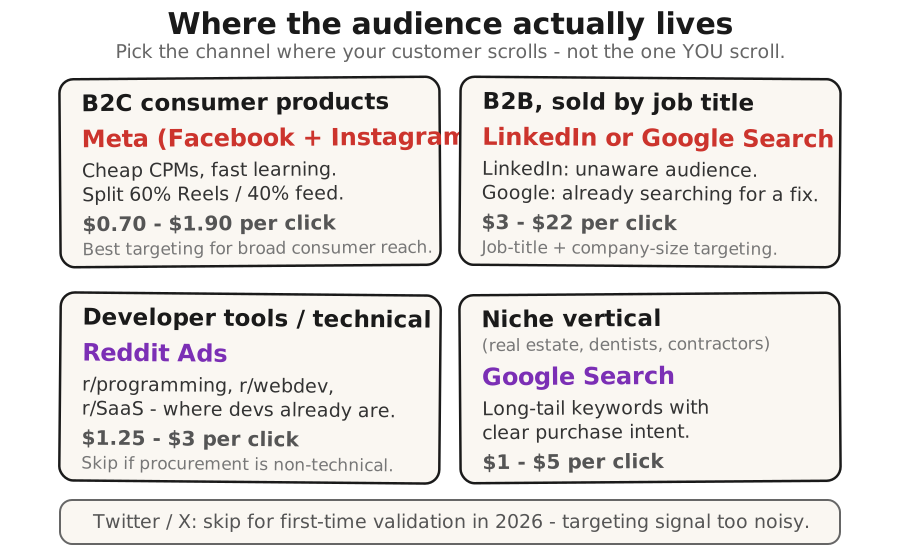
B2C Consumer #
- Channel: Meta ($0.70-$1.90 CPC). Split 60/40 Reels/feed.
- When to pick: Product is visual, audience is broad.
- Skip when: Customer 55+ OR enterprise.
B2B / Job-Title-Sold #
- Channel: LinkedIn ($5.70-$22 CPC) OR Google Search ($3-$8).
- When to pick: LinkedIn for unaware audiences; Google for active searchers.
- Skip when: Consumer or under-25 audience.
Developer Tools #
- Channel: Reddit Ads ($1.25-$3 CPC).
- When to pick: Audience in r/programming, r/webdev, r/SaaS.
- Skip when: Non-technical procurement role.
Niche Vertical #
- Channel: Google Search ($1-$5 long-tail intent).
- When to pick: Real estate, dentists, contractors Googling pain.
- Skip when: N/A - Google Search works for most verticals.
Twitter / X: Skip for first-time validation in 2026 - targeting signal too noisy after 2024-2025 platform changes.
Before Your First Campaign: Create the Ad Account #
You need an ad account before you can create a campaign. Each platform has a one-time setup flow - plan 60-90 minutes for your first one. (Approval times: see Ad-Account Setup Timing above.)
- Meta: Go to business.facebook.com → Create account → verify your business (email or domain) → create ad account → add payment method.
- Google Ads: Go to ads.google.com → Sign up → enter billing info → create a dummy campaign to complete account setup (pause it immediately - this is NOT your real smoke-test campaign; that comes in Lesson 1.4).
- LinkedIn: Go to linkedin.com/campaignmanager → create account → add company page → add payment method.
- Reddit Ads: Go to ads.reddit.com → sign up → add payment method.
Do this the weekend before you plan to launch. If approval takes longer, you’ll still hit your Monday start.
Campaign Creation Recipes #
You picked your channel above and created your ad account. Here are the settings to use when you create your first campaign. Each ad platform changes its button labels regularly, so these recipes name the what and why - find the matching fields in your platform’s campaign creation flow.
Budget note: These recipes use conservative starter budgets for your first campaign. To hit 300 visits, scale the daily budget up using the CPC rates in the channel table above. Example: at Meta’s $0.70-$1.90 CPC, 300 visits costs $210-$570 total - aim for $40-80/day over 5-7 days.
Write the Ad With AI (Copy + Image) #
You do not have to invent ad copy from a blank page. You already have everything the ad needs: your Founding Hypothesis, your landing page words, and your customer’s own pains and goals. Paste this prompt into any AI chat tool (ChatGPT, Claude, Gemini) - fill the brackets with what you have, set [CHANNEL] to Meta, Google, LinkedIn, or Reddit, and it writes the ad for you:
You are a direct-response copywriter writing a first test ad for a product that has not launched yet. The goal is a simple demand test: get the right people to click through to a landing page and hand over an email. No hype, no fake urgency - just clear words in the customer's own language.

Here is everything I have:
- Founding Hypothesis: [paste your one-sentence hypothesis from Lesson 1.1]
- Landing page headline: [paste your headline]
- Landing page value props: [paste your 2-4 value prop lines]
- Customer pains, in their own words: [paste the exact phrases your customers use - from interviews, Reddit, reviews]
- Customer gains / goals: [what they are trying to achieve - the win they want]
- Channel this ad runs on: [CHANNEL]

Write me:
1. Two to three PRIMARY TEXT variants (the main ad body). Use the customer's own vocabulary from the pains above - not marketing language. Match the tone of [CHANNEL] (Reddit = casual and honest, LinkedIn = professional, Meta = friendly and visual, Google = short and intent-driven).
2. Two HEADLINE variants (short, under 40 characters where the channel needs it).
3. One IMAGE CONCEPT: describe a single image I can either generate with an AI image tool or fake with a simple product screenshot. Tell me exactly what should be in the frame and why it fits the message.
4. A plain-English note telling me WHICH variant to run first and why - written so a non-marketer understands the reasoning.

Keep every variant honest to the hypothesis. Do not promise features the product may not have.
Run the ad it gives you first. If the click-through rate is low, come back to this prompt and ask it for a second round using a different pain from your list.
Meta Ads (Facebook/Instagram) #
- Campaign objective: Pick “Traffic” (not “Conversions” - you need pixel data before conversion optimization works).
- Budget: $10-20/day. Set a lifetime budget of $70-140 to hit ~100-200 visits (CPC $0.70-$1.90). Add 20% for creative iteration.
- Audience: Start broad. Meta’s AI optimizer is better than manual interest stacking in 2026. If your
[CUSTOMER]blank is “solo chiropractors,” add one interest (Chiropractic) and let the rest run broad. Age 25-55. All genders unless your product is gender-specific. - Placement: Advantage+ placements (automatic). Let Meta decide where your ad shows.
- Ad creative: Single image (your hero image from Lesson 1.2, or the AI-generated one). Primary text: your value prop sentence (1-2 lines from your landing page). Headline: your landing page headline. CTA button: “Learn More” or “Sign Up.” Destination: your landing page URL.
- Tracking: Your Meta Pixel should already be installed (Lesson 1.4, step 1). In Ads Manager, under the ad set, verify the pixel is selected. If it says “No pixel,” go back to that step and install it.
- Launch: Hit Publish. Expect 24-48 hours for first-time ad account review. Do not touch the campaign for 5-7 days after it starts spending.
Google Ads (Search) #
- Campaign type: Search campaign. NOT Performance Max (too broad for a smoke test). NOT Display (low intent).
- Budget: $20-50/day. Set max CPC bid at $3-8 (see channel table above for your use case).
- Keywords: 10-20 keywords in phrase match. Use your
[PROBLEM]blank as the seed. Example: if your hypothesis is about chiropractor insurance claims, bid on “chiropractor insurance claim software,” “resubmit denied claims chiropractor,” “chiropractic billing automation.” - Ad creative: 3 headlines (Google shows 1-3). Headline 1: your landing page headline. Headline 2: one value prop. Headline 3: CTA (“Try It Free” or “See If It Works”). 2 descriptions. Description 1: your sub-headline. Description 2: one more value prop. Final URL: your landing page.
- Tracking: GA4 is installed (Lesson 1.3). In Google Ads > Tools > Linked Accounts, link your GA4 property. This takes 30 seconds - click “Link” next to your GA4 property, confirm, done.
- Launch: Submit. First-time accounts go into 24-hour review. Do not touch for 5-7 days.
LinkedIn Ads #
- Campaign objective: Website visits.
- Budget: $50-80/day minimum (LinkedIn CPC is $5.70-$22). If this is too steep, use the B2B budget alternatives section above instead.
- Audience: Job title + industry + company size. Use your
[CUSTOMER]blank literally. If your hypothesis says “CTOs at 20-50 person SaaS companies,” target exactly that. Do not broaden - on LinkedIn, narrow targeting is cheaper (less competition per audience slice). - Ad format: Single image ad.
- Ad creative: Intro text: your value prop (keep it professional - LinkedIn readers expect B2B tone). Headline: your landing page headline. Image: your hero image or a simple text-on-color card. CTA: “Learn More” or “Sign Up.” Destination: your landing page.
- Tracking: LinkedIn Insight Tag should already be installed (Lesson 1.4, step 1). In Campaign Manager, the tag should auto-detect if it’s on your page.
- Launch: Submit. First-time advertiser verification can take 48-72 hours. Start account setup Friday, launch Monday.
Reddit Ads #
- Campaign objective: Traffic.
- Budget: $10-25/day. Reddit CPC is $1.25-$3.00.
- Targeting: Community targeting. Pick 3-5 subreddits where your
[CUSTOMER]hangs out. For a developer tool: r/programming, r/webdev, r/SaaS. For B2B: r/startups, r/Entrepreneur. DO NOT target r/all - you’ll burn budget on irrelevant clicks. - Ad format: Promoted post (looks like a regular Reddit post with a “Promoted” tag).
- Ad creative: Title: your headline, rewritten in Reddit’s casual tone. “We built a thing that [SOLVES_X_PROBLEM]” works better than polished marketing copy. Body: 2-3 sentences. Problem → solution → link. Authentic, not salesy. Link: your landing page.
- Tracking: Reddit Pixel should be installed (Lesson 1.4, step 1). In Ads Manager, the pixel status should show “Active.”
- Launch: Submit. Reddit typically clears same-day. Comments will appear under your ad - leave them up unless they’re spam. Real comments are free social proof or free feedback.
Run Length and Volume #
Run length: Do not judge a campaign on its first few hours. The opening burst of any paid run attracts the platform’s most reactive clickers - the people who click everything - so early conversion almost always over- or under-shoots the steady-state number. Let daily numbers normalize and stabilize before reading the rate.
Volume: ≥300 paid visits. Below 300 the sample is too small to distinguish 2% from 5%. With 300 visits a 5% conversion is 15 signups, a 2% is 6 signups - the difference between 15 and 6 is meaningful. With 100 visits a 5% is 5 signups, a 2% is 2 - you cannot tell whether you have a hot audience or a noisy one.
Conversion Rate Benchmarks #
The Foundry CRO 2026 industry benchmark report (citing Unbounce Q4 2024 data):
| Benchmark source | Median conversion rate |
|---|---|
| All industries (aggregate) | 6.6% |
| SaaS / technology | 3.8% |
| B2B professional services | 1-3% |
| Paid search traffic | 3.2% |
| Paid social traffic | 1.5% |
These are aggregate medians across mature products with optimized funnels. Your unoptimized smoke test against cold traffic at week one is comparing against a different baseline. Use the go/iterate/kill table from the micro-lesson - not the industry medians - as your decision threshold.
When the Smoke Test Isn’t the Right Filter #
The smoke test misses founders whose product genuinely needs a longer education arc to make sense (a category-creation product, a complex B2B integration, a regulated-industry tool). What this looks like in the numbers: a 2-3% conversion rate that the founder reads as “kill the hypothesis” when the real signal is “this product needs a sales motion, not a Meta ad.”
If your hypothesis sentence is hard to fit in a headline, the smoke test is not the right filter - run a paid-pilot conversation instead. See Charge Before You Ship.
Built by JetThoughts as a companion reference to the From Idea to First Paying Customer free curriculum.