In this module
Module 4 · Lesson 4.2 · [CORE] · From Idea to First Paying Customer
Input: a build-path decision from Lesson 4.1 (self-serve or hire)
Output: a Day-1 audit confirming you own your code, cloud, and domain before the build starts (or a recovery plan if you don’t)
Progress: M4 · 2 of 5
If you signed up for Lovable + Supabase + Stripe yourself (the default Path 2 from Lesson 4.1), here is your 5-minute self-check - the rest of this lesson applies the day you hire a contractor:
- GitHub: account in your name, your email, your password manager. (If you used Lovable’s “sign in with Google,” your Google account IS the GitHub owner. Confirm.)
- Lovable + Supabase + Stripe: signed up with your personal email, billed to your card. (Not a co-founder’s, not a friend’s.)
- Domain (if purchased): registered to your name in your registrar account.
- No shared admin passwords: only you have the master password to each.
- 2FA on all four (GitHub, Supabase, Stripe, domain registrar): turned on. 2FA (two-factor authentication) is the 6-digit code your phone shows at login, a second proof on top of your password.
Pass all 5? You can skim the rest of the lesson as a future reference. Fail any? Fix that one before continuing - the 12-item audit below is the deeper version.
The cheapest day to confirm you own your own infrastructure is Day 1, before you hand a credit card to a contractor. The most expensive day is month 14, when production breaks at 9pm and you cannot push a fix because the database password lives in someone else’s inbox. In 2025, one founder learned this the hard way: fourteen months into a build, 1,800 paying clinics, a Stripe account in the founder’s name - and the AWS root password sitting in the contractor’s personal Gmail. It took three emails and six days to get the root account email changed.
Ownership means you control the GitHub org, the AWS root account, the domain registrar, and the production database. A Day-1 audit is what lets you switch contractors on Tuesday without losing access to your own codebase on Wednesday. Open the AWS console right now and click your account name in the top-right corner. Read the email address on the root user. Whose inbox does that land in tonight?
The 12 items, in four zones #
The audit covers 12 credentials grouped into four zones. Each item has one pass criterion: an email on a domain you control, a card you own, MFA on a phone in your pocket, and a password in a vault you can read. The full audit - with the exact recovery steps when an item fails - lives at the GitHub / AWS / Database Ownership Checklist.
Acronyms in the table below: IAM = Identity and Access Management (AWS’s user-permissions system, separate from the root account). MFA = Multi-Factor Authentication (the 6-digit code your phone shows when you log in - a second proof beyond your password). WHOIS = the public registry that shows who legally owns a domain. ICANN = the global body that enforces domain-transfer rules. DNS = Domain Name System (the address book that points your domain at your servers; the “A record” is the one line that says which server answers).
| Zone | Item | Pass Criterion |
|---|---|---|
| Code | GitHub org owner | Your company email, not the agency’s |
| Repo (code repository) collaborators | Can be removed by you alone, without permission | |
| Branch protection on main | Enabled and you can override in an emergency | |
| Cloud | AWS root account email | Sits on a domain you control |
| Billing card | Yours and you can download every invoice yourself | |
| IAM admin user | In your name with MFA on, separate from root | |
| Secrets and database | Production DB credentials | Readable by you tonight without paging an engineer |
| Secrets store | (Secrets Manager, Vault, Doppler) administered by you | |
| Database backups | Running nightly with a restore runbook you can execute | |
| Domain and external services | Domain registrar | WHOIS shows your name and your renewal email |
| DNS provider | Logged in under your account with MFA, ready to add an A record now | |
| Third-party API keys | (Stripe, SendGrid, Twilio, OpenAI, Plaid) on your account, your card |
Two of the twelve are existential. AWS root email controls whether a contractor can lock you out in ten minutes. Domain registrar turns into a 14-day practical buffer (transfer approval itself takes about five days; the 60-day post-registration lock is the ICANN rule) if someone else will not release the auth code. The other ten matter; these two end the company if they go wrong.
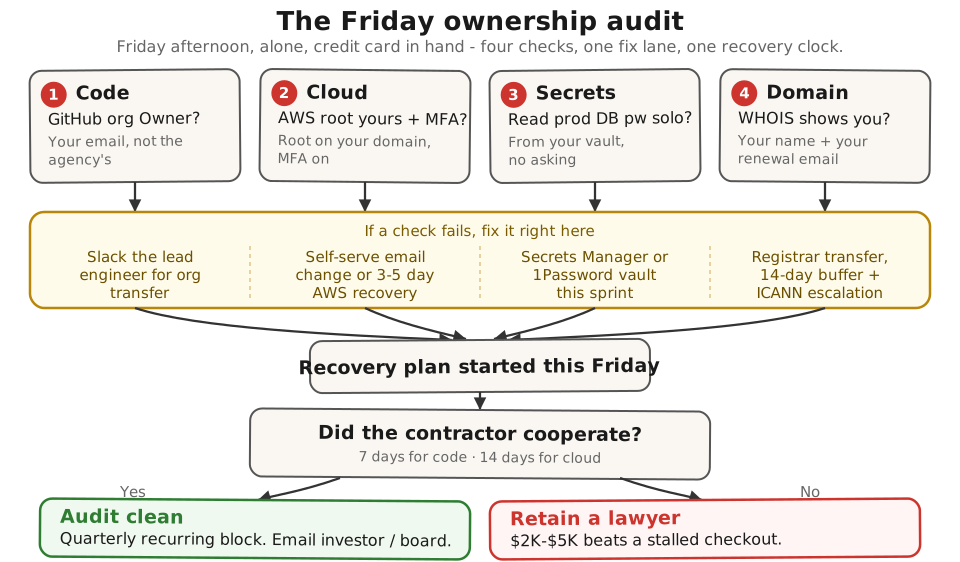
Most audit failures are sloppy Day-1 setup, not malice - a contractor moving fast in the kickoff sprint who used whatever email was logged in, and nobody went back to clean it up. The full ownership reference has the good-vs-bad walkthrough for the three items that fail most, the 2026 AI-contractor credential trap, and the exact three-step recovery sequence with the AWS support script and the registrar auth-code request template.
Audit:
- Block 45 minutes on your calendar titled “Ownership audit.” Treat it like an investor meeting - phone on Do Not Disturb.
- Open the AWS console first. Top-right, click the account name, click Account, and read the root user email. If it is not on a domain you control, that is your audit’s first failure.
- Work down the 12-item table above (or the printable checklist). Record pass or fail for each item.
- For every failure, note the recovery step and start it this sprint. If three or more fail, consider the 30-day exit guide for a structured transition.
- Success check: all 12 items are marked pass or fail, and every failure has a named recovery action with a date - a one-page summary you could forward to your investor or board.
If this fails: the AWS root email belongs to someone else and they won’t cooperate.
- Why: AWS treats whichever email is on the root as the legal account holder, so your incorporation paperwork does not move them until support has run its recovery process.
- Fix: start the AWS root account recovery process immediately (3-5 business days). Do not build another line on an account you don’t own - the deeper you build, the more expensive the eventual transfer.
Whose inbox did the AWS root email land in tonight? If the honest answer is “I’m not sure,” that uncertainty is the whole reason this lesson comes before the build, not after.
Done: all 12 items on the ownership checklist are audited, failures are documented, and a recovery plan exists for each failure.
You have now: a quality-checked one-page brief (3.2) + a build-path decision (4.1) + a passed ownership audit (4.2), all saved in your
Founder OSfolder. The build itself is the next step.Next: 4.3 · The Self-Serve MVP Stack: Tools & Setup - it builds on the accounts you now own.
If blocked: see “If this fails” above.
Deeper reference: The good-vs-bad walkthrough, the 2026 credential trap, and the full recovery sequence
Already mid-build with a contractor? #
A side-path for readers who came from the course overview’s Already started building? fork - you are already typing, or paying someone an hourly rate to type for you. The ownership audit above is step one. Run these before you approve any more work:
- Demand one Friday demo with working software only - no Jira tickets, no slides, no “almost done.” - Friday Demo Rule
- Require a plain-English weekly report: what shipped, what’s blocked, what’s next. - Weekly Dev Report
- Stop specifying features. Quality-check your scope against actual user outcomes before the build gets out of hand. - Stop Specifying Features
- If your build is stalled and you’re not sure whether to fix it or start over, run the salvage-vs-rebuild decision tree first. - Salvage vs Rebuild Decision Tree
- If your team is shipping AI features, check the vendor contract. Make sure per-question AI costs aren’t passing through to your invoice. - “We Use AI” Follow-Up Questions
See it in action: Module 4 walkthrough: Mia ships TutorMatch
Built by JetThoughts as part of the From Idea to First Paying Customer curriculum.