Reference companion to Lesson 4.2 · Who Owns Your GitHub, AWS, and Database? - the 2026 credential trap, the good-vs-bad walkthrough for the three items that fail most, the full recovery sequence, and the advanced hardening notes. Read the micro-lesson first for the 12-item audit and the Friday routine; return here when an item fails and you need the deep recovery detail.
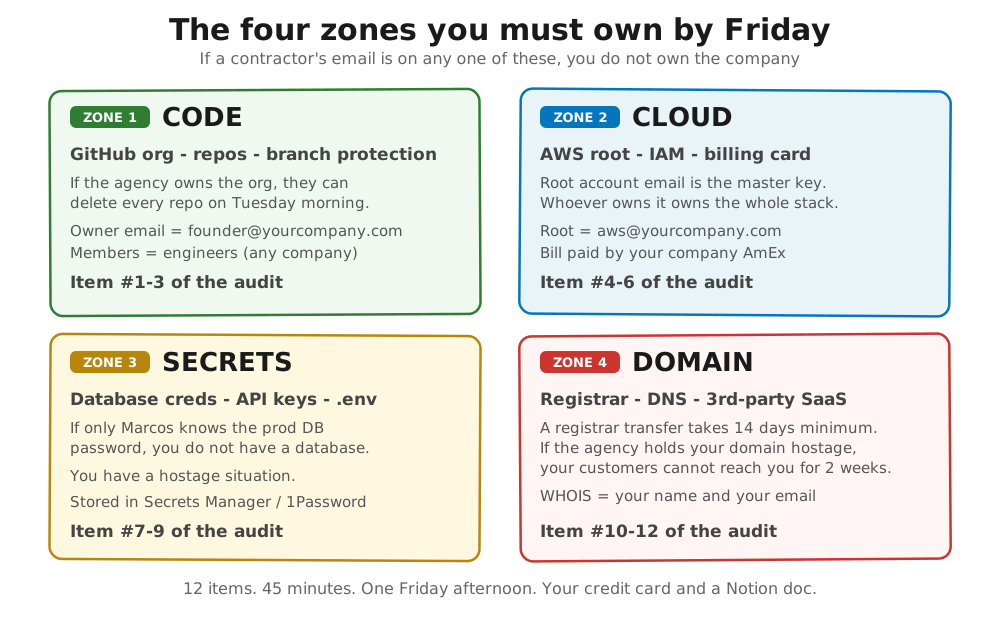
The 2026 credential trap looks different #
The contractors who create single points of failure in 2026 are not the same shops that did it in 2020. AI-augmented contractors spin up your entire infrastructure during the Cursor or Claude Code session on Day 1: GitHub org, AWS account, Vercel project, Supabase database, Stripe integration, Sentry, PostHog. They use whatever email was already logged in. Usually their own. The senior dev who set everything up moves to another client in month four. The junior who inherits your project does not know which credentials live where. Six months later, you are paying for accounts that nobody on the current team can administer.
There is a second pattern, even more common: the cloud-default-account problem. A contractor opens a fresh AWS account using the company credit card you handed them, then sets the root email to a shared dev@ mailbox that the agency owns. AWS treats whichever email is on the root as the legal account holder. Your incorporation paperwork is irrelevant if the root email belongs to someone else. AWS’s own root user documentation is blunt about this: the root user has unrestricted access, and recovering control without the root credentials means filing a support ticket with corporate documents and waiting days.
The financial damage is rarely the headline number on the contractor invoice. It is the day production breaks at 9pm and you cannot push a fix because you cannot read the prod database password. The week lost to support recovery while your customers see a maintenance page. None of that hits the budget line that says “engineering.”
What good looks like vs what bad looks like #
Every item rhymes the same way when it passes: an email on a domain you control, billing on a card you own, MFA (the same two-factor login code) on a phone in your pocket, and a password in a vault you can read. Failure rhymes too: somebody else’s email, somebody else’s card, and “let me ask Marcos” as the answer to “who can rotate this?”
Three pairs that come up most often in ownership audits.
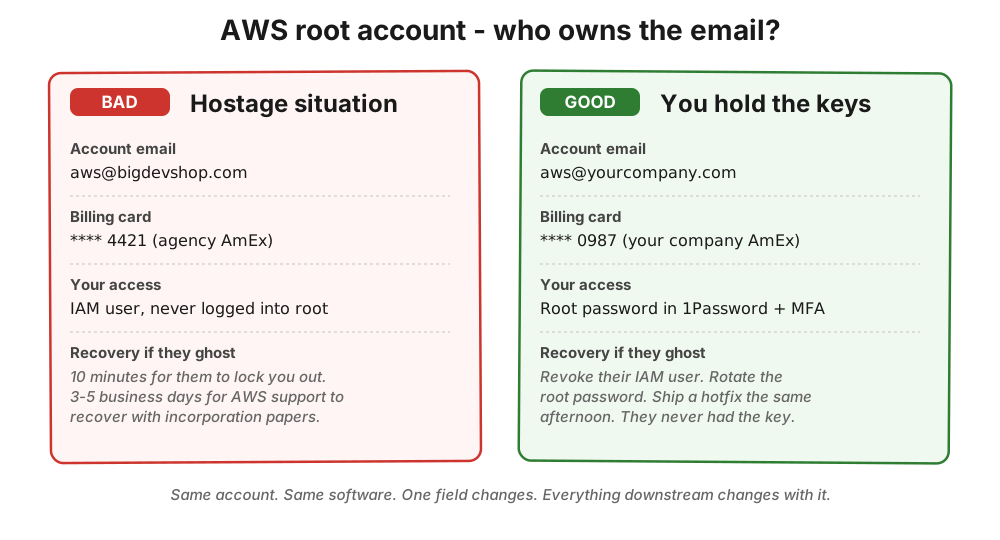
Item #4 - AWS root account email
Bad: Root email is
aws@bigdevshop.com. The bill goes to their AmEx ending 4421. You have an IAM user (a limited-permission login, not the all-powerful root account) but have never logged in as root. Good: Root email isaws@mycompany.com. The password is in your 1Password. MFA is on your phone with backup codes in your office safe. Bill goes to your company card.
If the contractor controls the root email, AWS support will treat them as the account holder, not you. The incorporation paperwork in your filing cabinet does not matter to AWS until support has worked through their recovery process - which takes 3-5 business days after you have proven who you are.
Item #7 - Production database password
Bad: “Marcos has it. Slack him and he can DM it to you.” Good: “I opened AWS Secrets Manager just now and read it myself. I rotated it once in March when we offboarded the previous DBA (database administrator - the person who manages your production database).”
The Marcos answer means you have a single point of failure. It does not matter whether Marcos is honest, kind, or available - one person holding the prod DB password is one person away from a production outage you cannot fix. Firing Marcos does not fix it. Putting the credential in a store you administer, with Marcos pulling read access from there, does.
Item #10 - Domain registrar
Bad: Domain renewal notices arrive at
dev@theiragency.com. You have never logged into Namecheap or GoDaddy in your life. Good: Logged into the registrar with your account. WHOIS shows your name. Auto-renew is on, charged to your card, and you have your phone scanned for MFA.
A domain transfer is the slowest recovery on the list. ICANN’s Transfer Policy gives your current registrar up to five days to hand over the transfer auth code, allows a further five-day window for the losing registrar to release the transfer once you request it, and many registrars add a 60-day lock after registration or a recent transfer during which transfers cannot start at all. If someone else holds your domain and refuses to cooperate, your customers are looking at a static placeholder for two weeks while you escalate to ICANN’s transfer dispute resolution.
When the audit fails: a recovery plan that takes weeks, not months #
Most audit failures are sloppy Day-1 setup, not malice. The contractor was moving fast in the kickoff sprint, used whatever email was logged in, and nobody went back to clean it up. The fix follows three steps in this order, and the order matters.
| Step | What to do | Cadence |
|---|---|---|
| 1: Stop the bleeding | Get yourself an admin path into every system the contractor controls. AWS root password reset to your email. Your name added as GitHub org owner alongside theirs. Your card added as the primary on Stripe, SendGrid, and OpenAI. Do this before the next sprint so you have a quiet window before anyone notices. | This sprint |
| 2: Extract the IP (intellectual property - your source code and data, legally distinct from an IP network address) | Pull a fresh clone of every repo to a private GitHub org under your account. Export the database to an S3 bucket on an AWS account in your name. Document where every secret currently lives and where it will live after the migration. Work patiently on the existing setup. | Next sprint |
| 3: Legal escalation, only if needed | A reasonable cooperation window looks like 7 days for GitHub org transfer, 14 days for AWS root, and the auth code released at all for the domain. If they stall, retain a lawyer for a one-time $2K-$5K letter referencing your contract’s IP-assignment clause. | 7-14 days (or legal engagement) |
The ownership checklist template walks the exact recovery sequence per item, including the AWS support phone script and the registrar auth-code request template.
Advanced (optional) #
| Topic | When to scope | When to skip |
|---|---|---|
| Signed key infrastructure | You have 50+ users AND you handle regulated data. Rotating to asymmetric signing keys (AWS KMS, HashiCorp Vault Transit engine) means revocation actually removes access. | You have <50 users. Defer to month three, not month eighteen. |
| Security audit reference | Before an enterprise prospect sends a SOC2 questionnaire. Run AWS Trusted Advisor (free for Business/Enterprise) or Prowler (open-source). Both produce reports answering 80% of infra questions. | You have no enterprise prospects yet. No need for SOC2 or formal audit. |
Ownership audit done right means no Marcos stands between you and a 9pm Tuesday production fix.
Further reading #
- GitGuardian, The State of Secrets Sprawl 2024 - 12.8 million secrets exposed in public GitHub commits in 2023, with
.envfiles as one of the most common leak vectors. - Rails Guides, Security: Custom Credentials - the canonical Rails answer to the “where do production secrets live?” question, replacing the old
database.ymlplaintext pattern.
Built by JetThoughts as a companion reference to the From Idea to First Paying Customer free curriculum.