In this module
Module 4 · Lesson 4.3 · [CORE] · From Idea to First Paying Customer
Input: a “self-serve” build-path decision (from Lesson 4.1) + a quality-checked one-page brief (from Lesson 3.2) + a passed Day-1 ownership audit (from Lesson 4.2)
Output: the 3 pre-flight rules locked in and tool boundaries clear, ready to start the build in Lesson 4.4 · Build Phases
Progress: M4 · 3 of 5
Three tools do the whole self-serve build, and each one has exactly one job. The trap is opening Lovable before you know where its job ends and Supabase’s begins - that is how a founder ends up with auth hand-rolled in the UI layer and payment state scattered across three places. Get the boundaries and three pre-flight rules right first, and the build in Lesson 4.4 stays inside the shed.
→ Mia had never set up a database. She opened Lovable, pasted her brief’s Section 3, and let the three tools handle the rest. Full walkthrough →
If you completed Modules 1-3, your default Module 4 path is to build it yourself with Lovable (an AI app builder that turns a plain-English prompt into a working web app) + Supabase (managed database + login system) + Stripe (the service that charges the card). Hiring is a ceiling-signal trigger covered in the supplementary reference, not a parallel choice. You will not write code.
Not ready to commit to the build? Run a Concierge MVP first. Fake the automation by hand: collect customer requests through a Tally form (a form builder), route them into an Airtable base (a spreadsheet-database hybrid) with Zapier or Make (tools that pass data between apps automatically), and do the work behind the scenes yourself. Your customer experiences what looks like a working product while you find out whether anyone wants it, before you spend weeks in Lovable. This is the “Wizard of Oz” pattern from the course overview; when requests outgrow your hands, come back and build the real stack below.
Three tools, three jobs #
| Tool | Job | Cost |
|---|---|---|
| Lovable (UI) | Render the screens. Send form data down. | Free tier + paid tiers |
| Supabase (data + auth) | Store the user, the row, the file. Hold the login. Listen for Stripe events. | Free tier + paid tiers |
| Stripe (money) | Charge the card. Tell Supabase the customer is paid. | Per-transaction card fee |
The buyer opens the staging URL (the live web address where your work-in-progress app is visible) → Lovable shows the screens → Supabase stores the data → Stripe charges the card → a Stripe webhook (an automatic status message Stripe sends your app) tells Supabase the row is now paid.
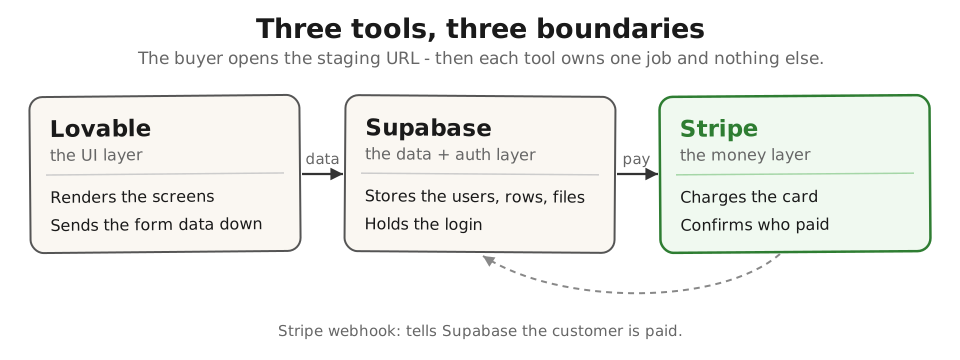
These three became the dominant self-serve path because all three were built AI-first, their documentation is exhaustive, and the integrations between them are templated to the point of being boring. Boring is what you want for an MVP: it lets one non-technical founder ship the full loop - signup, paid onboarding, the one feature that solves the validated problem - without ever opening a terminal. The full stack-and-tools reference has the plain-English deep dive on each tool.
The 3 pre-flight rules - true before you open Lovable #
Twelve rules keep a self-built MVP inside the shed, but only three must be true on day zero. Get these three right and the other nine read as inline checks while you build. Get them wrong and the other nine cannot save the project.
- Start from a one-page brief that passed the Lesson 3.2 quality-gate. If Section 3 is feature-shaped, fix it before you open Lovable - feature-shaped briefs produce sprawling admin panels.
- One workflow, one persona, one happy path. No multi-tenancy, no admin dashboard, no settings page on day one. Build the shed (Rob Walling’s analogy), not the house.
- Set up GitHub sync in Lovable Settings on day 1. GitHub (the online folder that stores your code) is your backup if Lovable drops the work. Skipping this is the top reason founders cannot retrieve their source six months later.
Before you trust the build, have AI check it against the brief you locked in Lesson 3.2. Paste your brief’s Section 3 (the outcome-shaped feature list) into Claude, then paste this prompt - the same leakage check you ran in Lesson 3.2, now aimed at what Lovable is about to generate:
Here is Section 3 of my one-page brief (the outcome-shaped feature list). Based ONLY on this list, name 3 things a Lovable build of this brief would likely include that are NOT in the list. Be specific - feature names, not categories.
The three features it names are your scope-leak watchlist. Cut them from the Lovable prompt before you build, not after. (The deeper build-time audits - the Supabase row-level-security check and the screenshot happy-path walk - live in the stack-and-tools reference; run them once the build exists.) AI can flag scope leak against your brief, but it cannot prove real users can navigate the workflow or that the architecture holds at scale - only uncoached users and real traffic do that.
Set up:
- Open your one-page brief from Lesson 3.2. Confirm Section 3 reads as outcomes, not features (pre-flight rule 1).
- Write one sentence naming your single workflow, single persona, and single happy path (pre-flight rule 2). If you cannot fit it in one sentence, the scope is too big - cut until you can.
- Paste Section 3 into Claude with the leakage-check prompt above. Save the 3 flagged features as your “do not build yet” list.
- Sign into Lovable, open Settings, and turn on GitHub sync (pre-flight rule 3).
- Success check: you can name what each tool does, your one-sentence scope is written down, GitHub sync is on, and you have a 3-item scope-leak watchlist from Claude.
If this fails: the 12-rules list feels like homework and you still haven’t opened Lovable.
- Why: the full rule set reads as a prerequisite checklist, but only rules 1, 2, and 6 (the three pre-flight rules above) must be true before you start - the rest fire inline during the build.
- Fix: ignore the other nine for now. Lock the 3 pre-flight rules, paste your brief’s Section 3 into Lovable, and ship one screen tonight. The inline rules become reminders as you hit them in Lesson 4.4.
Can you say your whole build in one sentence - one workflow, one persona, one happy path? If it takes two sentences, you are describing the house, not the shed, and Lovable will build exactly what you describe.
Done: you can name what each of the three tools does, the 3 pre-flight rules are locked (brief quality-gate passed, one workflow scoped, GitHub sync on), and you have a scope-leak watchlist from Claude.
You have now: a validated problem statement (2.5) + a quality-checked one-page brief (3.2) + a self-serve build decision (4.1) + a passed Day-1 ownership audit (4.2) + the three-tool stack mapped and the 3 pre-flight rules locked (4.3). The build itself is the next test.
Next: 4.4 · The Self-Serve MVP Stack: Build Phases - takes the 3 pre-flight rules and the stack you just mapped into the Phase 1-4 build.
If blocked: see “If this fails” above.
Deeper reference: Each tool in depth, the M2-vs-M4 contrast, all 12 rules, and the founder communities
See it in action: Module 4 walkthrough: Mia ships TutorMatch
Built by JetThoughts as part of the From Idea to First Paying Customer curriculum.