Template companion to Lesson 4.3 · The Stack and 4.4 · Build Phases. Print it, pin it by your monitor, and work one session at a time.
Session-by-session tasks for shipping the Lovable + Supabase + Stripe MVP. Cross off as you go.
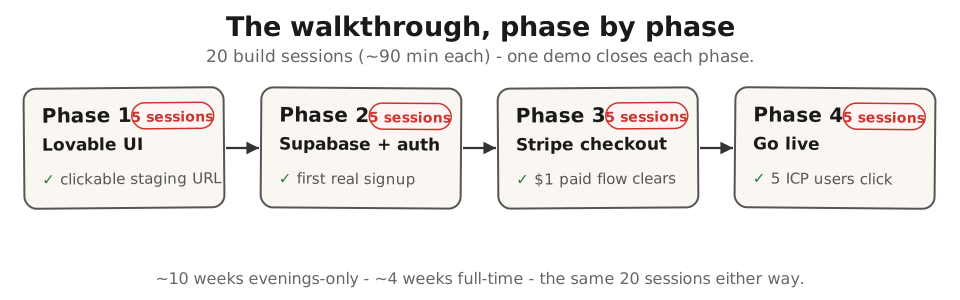
The 4-phase roadmap:
- Phase 1 - Lovable + the UI (no backend yet). Demo: clickable staging URL.
- Phase 2 - Supabase + auth (real signup works). Demo: first real signup persists.
- Phase 3 - Stripe + checkout ($1 test transactions). Demo: end-to-end paid flow.
- Phase 4 - staging URL + 5 ICP users click. Demo: live data review from 5 prospects.
Two paces, same four phases. Pick the row that matches the time you actually have. This course is built for the evenings-only founder - plan for that row.
| Your available time | Calendar length | Cadence |
|---|---|---|
| Evenings only, 2-4 hrs/week (the course default - plan for this one) | ~10 weeks | 1-2 build sessions a week; one demo at the end of each phase |
| Full-time, daytime hours | ~4 weeks | 4-5 build sessions a week; one demo at the end of each phase |
Each phase below is written as five build sessions (roughly 90 minutes each). The work is the same ~30 hours either way - the only difference is how many calendar weeks you spread it across. An evenings-only founder runs about two sessions a week and reaches the live MVP in roughly ten weeks; that is on plan, not behind. The Module 4 Mia walkthrough ships across ten calendar weeks for exactly this reason.
Why this exists #
A two-person co-founder team we spoke with last month spent eleven weeks on Lovable before they had a single paying user. Not because the tool was wrong - because they kept rebuilding the same first screen from different prompts every week. They had no plan. Each work block started with “let’s polish the dashboard” and ended with the same broken Stripe webhook nobody had wired. By the time they came up for air, the runway-to-paying-customer math no longer worked. We walked them through the phased plan below one afternoon. They restarted from Phase 1, ignored the eleven weeks of half-built screens, and shipped a paid signup flow, then a first paying dollar shortly after. The plan is the difference between steady phased progress and eleven weeks of polish.
The tool stack does not ship the MVP. The schedule does.
How to use this #
Print one side of paper. Tape it to the wall next to your monitor. At the start of each phase, read its session list, calendar the build sessions (about 90 minutes each), and pick the demo audience. At the end of the phase, do the demo and write the one-line result at the bottom of the phase. If a demo fails the goal, repeat the last session. Do not advance until the phase’s demo lands.
Total time budget: about 30 hours of build work (roughly twenty 90-minute sessions), plus ~$90 in tool subscriptions and a domain. An evenings-only founder running two sessions a week reaches the live staging URL with paid signup in about ten weeks; a full-time founder in about four. Same phases, same demos - only the calendar spread changes.
If a session runs long, or a phase takes you a couple of extra weeks, you are normal. If one build session produces nothing usable, the prompt you started it with was wrong; rewrite the prompt before continuing.
Pre-flight checklist (before Phase 1) #
Every box below must be checked before Phase 1. If any is unchecked, do that first - the plan does not work without the inputs.
- One-page brief finalized (template)
- Validated Problem Statement filled in (template)
- Build Path Decision Worksheet verdict = Path 2 (Self-serve)
- One Lovable account created (Free tier OK to start; upgrade to a paid plan - check Lovable's pricing page - around Phase 2)
- One Supabase project created (Free tier OK through Phase 4)
- One Stripe account created in test mode (verify the email)
- One GitHub account (Free plan is fine for a solo founder)
- Recurring calendar blocks scheduled: your build sessions, ~90 minutes each (two a week evenings-only, more if you are full-time)
- Demo audience chosen for each phase (spouse, advisor, peer founder, ICP prospect - rotate)
Phase 1 - Lovable + the UI (no backend yet) #
Goal: a clickable UI on a public staging URL. No data persists. Phase demo: a non-PRD reader navigates the screens without a tour.
Session 1 - write the first prompt #
Open the one-page brief’s “what you’re building” section. Paraphrase the smallest workflow into a single Lovable prompt. Sample (fitness coaching SaaS):
Build a dashboard for a fitness coach.
- Top bar: coach name + log out
- Left sidebar: list of clients (name, last check-in date,
  status badge: green if checked in this week, red if not)
- Main pane (when a client is clicked): client detail page
  with a check-in form (date, weight, notes, 3-photo upload)
- Save button. Toast notification on save.
Paste into Lovable. Iterate by chatting: “make the badges bigger,” “move the check-in form to the right side.” Stop when the screen matches the PRD’s screenshot mock.
Session 2 - second screen + signup placeholder #
Add the signup screen and a paywall placeholder (no real auth yet). Sample prompt:
Add a signup page at /signup with email + password fields
and a "Start 14-day trial" button. Add a paywall page at
/upgrade that says "Your trial ends in N days" and has a
"Pay $29/month" button. Both buttons can be no-op for now.
By end of day: signup -> dashboard -> client detail -> check-in form. All clickable. Nothing saved.
Session 3 - second workflow screen #
Add the export-to-CSV screen (or whatever your second core screen is from the PRD). One screen per session in Phase 1; you are buying yourself the iteration room.
Session 4 - polish + GitHub sync #
Read every screen aloud. Anything that needs more than 5 seconds to understand: rewrite the prompt. Then go to Lovable Settings, connect a new GitHub repo, push everything. Verify the commit lands on github.com.
Session 5 - demo to a non-PRD reader #
Send the staging URL to someone who has not read the one-page brief. Watch them try to use it (over screen-share or in-person). Do not narrate. Note every place they pause for more than 3 seconds. Those are your Phase 1 bugs in design, not in code.
Result line (fill in): ____________________________________________
Good - Phase 1 done: a clickable UI on a public staging URL, GitHub-synced, that a non-PRD reader can navigate without a tour.
Phase 2 - Supabase + auth (real signup works) #
Goal: a real user signs up, lands in the dashboard, sees their data persist across a refresh. Phase demo: your spouse or first ICP signs up, you watch their row appear in the Supabase console live.
Session 1 - schema design (90 minutes max) #
Open the Supabase Table Editor. For the fitness coach example, create three tables:
-- Coaches (the user account)
create table coaches (
  id uuid primary key default uuid_generate_v4(),
  email text unique not null,
  full_name text,
  subscription_status text default 'trial',
  trial_ends_at timestamptz default now() + interval '14 days',
  created_at timestamptz default now()
);

-- Clients (each coach has many)
create table clients (
  id uuid primary key default uuid_generate_v4(),
  coach_id uuid references coaches(id) on delete cascade,
  full_name text not null,
  created_at timestamptz default now()
);

-- Check-ins (each client has many)
create table check_ins (
  id uuid primary key default uuid_generate_v4(),
  client_id uuid references clients(id) on delete cascade,
  check_in_date date not null,
  weight_kg numeric,
  notes text,
  photo_urls text[],
  created_at timestamptz default now()
);
Cap the schema at 3-5 tables for Phase 2. Anything more is scope creep.
Session 2 - enable Row-Level Security on every table #
In Supabase, click each table > Authentication > Enable RLS. Then add the policy: a coach can only read/write rows where coach_id = auth.uid(). Sample policy on clients:
create policy "coaches see only their clients"
  on clients for all
  using (coach_id = auth.uid());
Without RLS, your first bug ships every coach’s data to every other coach. With RLS, the bug is impossible by construction. This is the single most important thing you do in Phase 2.
Session 3 - connect Lovable to Supabase #
In Lovable: install the Supabase integration (Settings > Integrations). Paste the project URL and anon key. Update your signup screen prompt:
Wire the signup page to Supabase auth using the JS client.
On submit: call supabase.auth.signUp() with email + password.
On success: insert a row into the `coaches` table with
the new auth.uid() and the email. Redirect to /dashboard.
Do the same for the dashboard data: supabase.from('clients').select() filtered by the logged-in coach.
Session 4 - data persistence end-to-end #
Sign up as a fake coach in Lovable’s preview. Add three fake clients. Refresh the page. Data should still be there. Open the Supabase console: rows are visible. Drop the database connection in Lovable, refresh: error. Reconnect, refresh: data back. You have proven the data lives in Supabase, not in Lovable’s local state.
Session 5 - first real signup #
Send the staging URL to your spouse (or one ICP peer). Ask them to sign up with their real email. Open the Supabase console next to your screen. Watch the row appear. That is the demo.
Result line (fill in): ____________________________________________
Good - Phase 2 done: a real signup persists across refresh, RLS is on, and the first row appears in the Supabase console live during the phase demo.
Phase 3 - Stripe + checkout ($1 test transactions) #
Goal: a user signs up, hits the paywall after the trial, pays $1 in Stripe test mode, lands on the paid dashboard. Phase demo: you walk through your own flow, end to end, with a $1 charge that clears.
This phase looks the most technical on paper - you will see database snippets and function names below. You write none of it by hand: the AI generates each block, you paste it where the step says, and the checklists tell you what “working” looks like. Treat the code the way you treat a boarding pass - you carry it, you do not have to understand the barcode.
Session 1 - one product, one price, in Stripe test mode #
In the Stripe dashboard (Products > Add product):
- Name: Coach Dashboard Monthly
- Price: $29.00 / month, recurring
- Trial: not configured here (we handle the 14-day trial in our own
coaches.trial_ends_atcolumn; Stripe just charges immediately when the user clicks Pay)
Copy the Price ID (price_1...).
Session 2 - Stripe Checkout integration #
Update Lovable’s paywall prompt:
On the /upgrade page, change the "Pay $29/month" button to
create a Stripe Checkout session via supabase.functions.invoke('create-checkout', { priceId, coachId }) and redirect to the returned URL.
In Supabase Edge Functions, create one function create-checkout that calls stripe.checkout.sessions.create() with the price ID, the coach’s ID in client_reference_id, and the success/cancel URLs pointing back to the staging URL. Stripe documents this end-to-end at docs.stripe.com/checkout/quickstart.
Session 3 - the webhook that flips paid status #
Create a second Supabase Edge Function stripe-webhook that listens for checkout.session.completed events and updates coaches.subscription_status = 'active' for the coach in client_reference_id. Add the webhook URL to Stripe’s developer dashboard.
Two settings make or break this function.
1. Turn OFF “Verify JWT” for stripe-webhook (in Supabase: Edge Functions -> your function -> Settings). Supabase rejects callers without a Supabase login by default, and Stripe doesn’t have one - leave the toggle on and every delivery bounces with a 401 before your code runs.
2. Verify Stripe’s signature. Because turning off JWT makes the URL publicly callable, the function must check the signature before trusting anything: verify the Stripe-Signature header against your webhook signing secret (the whsec_... value) on the raw request body. Ask your AI assistant for “a Supabase Edge Function that verifies a Stripe webhook signature” and it will produce this pattern; the point is to know both settings exist.
To test it without leaving your browser (this course’s no-terminal path): in the Stripe Dashboard, go to Developers -> Webhooks -> click your endpoint -> Send test event, choose checkout.session.completed, and send it. Watch the row in Supabase flip from trial to active. The cleanest test, though, is the real thing: run one $1 test checkout through your own signup flow in Session 4 and confirm the row flips then.
Optional terminal branch (skip if you never open a terminal). If you have installed the Stripe CLI and are comfortable at a command line, you can fire a synthetic event with
stripe trigger checkout.session.completed. Note the CLI’s synthetic event carries noclient_reference_id, so it will not match a real coach row - use it to confirm the function runs, and the real signup flow to confirm the row updates.
Session 4 - end-to-end with a real test card #
Sign up as a fake coach. Skip the trial wait by manually editing coaches.trial_ends_at to yesterday in the Supabase console. Hit the paywall. Click Pay. Use Stripe’s test card 4242 4242 4242 4242, any future expiry, any CVC. Land on the paid dashboard. Verify the row in Supabase says active. Then test the failure path with 4000 0000 0000 0002 (declined) - user should land back on /upgrade with a friendly error. Reference: Stripe testing docs.
Session 5 - the loop demo to yourself #
Walk through the full flow in test mode: signup -> dashboard -> add a client -> log a check-in -> hit paywall -> pay $1 (use a different test price for $1 if you like) -> land on paid dashboard. Time the whole thing. If it takes more than 5 minutes, the friction is too high; rewrite the screens.
Result line (fill in): ____________________________________________
Good - Phase 3 done: a paid signup flow end-to-end in test mode, webhook verified,
subscription_statusflips fromtrialtoactivewithin a minute or two of a $1 charge (Stripe webhooks are asynchronous - delivery can lag or retry).
When the webhook doesn’t fire (troubleshooting in 5 minutes) #
The single most common Phase 3 stall: you trigger a Stripe test charge, the dashboard says the charge succeeded, but the row in Supabase never flips to active. Walk this table in order; stop at the first row that matches your symptom:
| # | Symptom | Likely cause | 60-second fix |
|---|---|---|---|
| 1 | Stripe dashboard shows the event, but nothing fired in your Supabase logs | Webhook endpoint URL has a typo, or the endpoint isn’t reachable | No terminal needed: open Stripe Dashboard -> Developers -> Webhooks -> your endpoint -> the attempts log, and read the delivery error Stripe recorded. Then confirm the endpoint URL is copied EXACTLY - https://<your-project>.supabase.co/functions/v1/stripe-webhook, one trailing slash or a missing https:// kills it. Still stuck? Paste the delivery error into Claude / ChatGPT. (Terminal-comfortable founders can instead live-tail with stripe listen --forward-to <that URL> - optional, not required.) |
| 2 | Logs show Webhook signature verification failed | Signing secret in your Supabase Edge Function environment variable does NOT match the secret Stripe is using | Open Stripe dashboard → Developers → Webhooks → click your endpoint → click “Signing secret” → “Reveal.” Copy the value (starts with whsec_). In Supabase: Edge Functions → your function → Settings → Environment variables. Replace the STRIPE_WEBHOOK_SECRET value with this exact string. Redeploy the function. Test mode and live mode have DIFFERENT secrets - if you went live without updating, this is why |
| 3 | Logs show the event arrived but no row updated | The checkout.session.completed payload’s client_reference_id field is empty OR doesn’t match any coaches.id | In your Stripe Checkout creation code, confirm you are passing client_reference_id: coach.id when generating the session. The CLI’s default trigger sends a synthetic event with no client_reference_id - test with a real signup flow, not stripe trigger, to validate this path |
| 4 | The right event subscription isn’t selected in Stripe | You created the webhook endpoint but only subscribed to payment_intent.* events, not checkout.session.completed | Stripe dashboard → Webhooks → your endpoint → “Listen to” → ensure checkout.session.completed is checked. Stripe defaults to a curated subset; this event is sometimes off by default |
| 5 | Logs show the function returned 200, row updated, but the UI still shows “trial” | Your frontend is caching the old subscription status | Hard-refresh the page (Cmd+Shift+R). If status is correct after refresh, the issue is Lovable’s data-fetch caching - add a 30-second refetch interval on the dashboard query, or refetch on focus |
If none of the 5 rows match, paste the Stripe event payload and your Edge Function code into Claude or ChatGPT with this prompt:
This Stripe webhook handler isn't updating my Supabase row - what am I missing?
Redact before you paste:
- delete the customer’s name, email, and address lines from the payload
- never paste secret keys (
sk_...,whsec_...)
The AI doesn’t need any of that to find the bug. If it still comes up empty, the Stripe webhooks documentation covers the long-tail signature, replay, and idempotency cases.
Idempotency reminder: every webhook handler must be safe to fire twice on the same event. Stripe retries on any non-2xx response (network blip, timeout, deploy mid-call) and the second hit must not double-charge or double-update. Keep a
stripe_eventstable whoseevent_idcolumn has a UNIQUE constraint, and INSERT the incoming event’s ID as the handler’s first step - if the insert fails because the ID is already there, return 200 immediately without re-running the update logic. One atomic insert beats a check-then-write, which two simultaneous retries can slip past together. This is one extra table; it prevents the support ticket that says “I got charged twice.”
Phase 4 - staging URL + 5 ICP users click #
Goal: a public domain pointing at the staging URL, 5 ICP prospects sent the link, real signup data logged. The final session is the data review.
Session 1 - go live (Stripe out of test mode) #
Switch Stripe to live mode. Recreate the product + price in live (Stripe does not auto-promote test data). Update the live API keys in your Supabase Edge Functions environment variables. Verify webhook signature secrets are the live ones, not the test ones. Run one $1 charge against your own credit card to confirm money actually moves. Refund the dollar in the Stripe dashboard.
Session 2 - buy a domain, point at staging #
Buy a domain on Porkbun ($10-$14 for a .com) or your registrar of choice. Never let a tool hold your domain. Add a CNAME record pointing your domain at the Lovable staging URL (Lovable’s docs cover this in Settings > Custom Domain). Wait for DNS to propagate (5-30 minutes). Verify the domain loads the staging URL.
Session 3 - send to 5 ICP prospects #
Pick 5 names from your Module 2 outreach list. Send each a 3-line cold message:
Hey [name] - the workflow you described last month
(logging client check-ins by hand on a spreadsheet) is
now a tool. 5-minute first-use, $29/month after a 14-day
trial. URL: [your domain]. Honest reactions only.
Send between 9am and 10am their local time on a Wednesday for highest reply rate. Do not send 25 in a panic; 5 well-targeted ones beat 25 sprayed.
Session 4 - watch the analytics #
Wire PostHog (its free tier includes session recordings - replays of a real visitor’s screen) or Plausible (page analytics only, no recordings) to the staging URL. If you chose PostHog, watch the recording of every signup. Write down: where do they pause? Where do they leave? What do they click that doesn’t do anything?
Session 5 - the data review #
Read the metrics. Three honest outcomes:
- 0 of 5 click: the cold message is wrong, not the product. Rewrite the message, send to 5 new names in your next outreach session.
- 5 click but 0 sign up: the landing screen is wrong. Rewrite the first paragraph above the signup form. Re-test next week.
- 5 sign up but 0 pay after trial: the paywall position or price is wrong. Try moving the paywall earlier (charge for the second core feature instead of the first), or test a lower price ($19 instead of $29).
The data picks the next week. Do not iterate on what you imagine; iterate on what the 5 actual people did.
Result line (fill in): ____________________________________________
Good - Phase 4 done: a live domain pointing at the staging URL, 5 ICP prospects sent the link, and real signup/click/pay metrics on the table for the data review.
Sample Lovable prompts (verbatim, copy-paste) #
Five prompts that ship most of a typical pre-seed B2B SaaS MVP. Adapt the persona/object names to your domain.
Prompt 1 (signup):
Add a signup page at /signup with email + password fields
and a "Start 14-day trial" button. Wire to supabase.auth.
signUp(). On success, insert a row into `coaches` with
the new auth.uid() and the email. Redirect to /dashboard.

Prompt 2 (list view):
Build a dashboard at /dashboard with a left sidebar listing
clients (name, last_check_in_date, status badge: green if
checked in this week, red if not). Fetch from
supabase.from('clients').select('*, check_ins(check_in_date)
.order(check_in_date desc).limit(1)').

Prompt 3 (detail view):
On /clients/:id, show client name, last 4 check-ins (date,
weight, notes, 1 thumbnail per check-in), and a "New
check-in" button.

Prompt 4 (form view):
On /clients/:id/check-in, show a form with date (default
today), weight_kg (number), notes (textarea), and 3-photo
upload (use Supabase storage bucket `check-in-photos`,
RLS policy: only the owning coach can read/write).
Save inserts into `check_ins` table.

Prompt 5 (paywall):
On /upgrade, show "Your trial ends in N days. Continue
for $29/month." with a "Pay" button. Wire the button to
supabase.functions.invoke('create-checkout', { priceId,
coachId }) and redirect to the returned URL.
See the Appendix for the full SQL schema and the Stripe integration checklist.
What good looks like vs what bad looks like #
Schema design
Bad: 15 tables, three of which are
users,accounts, andorganizationsbecause the founder read a SaaS architecture blog post once.
Good: 3 tables (
coaches,clients,check_ins) - one for the user, one for the thing the user manages, one for the action the user takes. The PRD lists exactly one user persona and one core workflow. The schema reflects that.
The bad answer is over-modeled for an imagined future scale. The good answer fits the validated problem from the PRD. You add the fourth table when a real customer needs it, not when you imagine they might.
Lovable prompt style
Bad: “Build me a SaaS dashboard.”
Good: “Build a dashboard for a fitness coach. Top bar: coach name + log out. Left sidebar: list of clients with green/red status badges based on last check-in date. Main pane shows the selected client’s detail and a check-in form. Save button shows a toast on success.”
The bad prompt forces Lovable to guess at a hundred details, half of which will be wrong, and you spend two days undoing them. The good prompt is the screenshot-in-words from your PRD. Lovable does the right thing on the first try when the prompt is this specific.
Stripe webhook handling
Bad: Trust the redirect from Stripe Checkout (
?session_id=...) to flip the user to paid. Skip the webhook because “the redirect already handles it.”
Good: Wire the
checkout.session.completedwebhook from Stripe to Supabase. Verify the signature with the webhook secret. Only flipsubscription_status = 'active'when the webhook fires. Treat the redirect as UX only, not as truth.
The bad pattern ships an MVP where any user with the right URL pattern can fake their own paid status. The good pattern uses Stripe as the source of truth. Skipping webhook signature verification is the second most common Stripe security bug. Lovable will not catch this for you. Wire it correctly in the first session of Phase 3.
Common mistakes (and how to avoid them) #
| Mistake | The rule | |
|---|---|---|
| Ownership | Skipping Row-Level Security in Supabase | Enable RLS on every table the day you create it - write the policies before the first row of seed data. Every coach sees every coach’s data the first time you forget. |
| Letting Lovable hold your domain | Buy the domain on a registrar you control (Porkbun, Cloudflare, Namecheap) and point it at Lovable via DNS. If you cancel Lovable, the domain still points at whatever you put behind it next. | |
| Skipping the GitHub sync | Turn on Lovable’s sync-to-GitHub in the first session of Phase 1. The day you cancel the subscription is not the day to discover your code only lives inside Lovable’s UI. | |
| Scope | Building 5 features instead of 1 | The phased plan ships ONE workflow end-to-end; the second feature comes after the first 5 ICP users click through the first. Skip this rule and you’re the founder with 11 weeks on Lovable, 4 half-built features, and no paid signups. |
| Iterating on imagined feedback | When only 1 of 5 clicked, iterate on the metric that failed - click rate (rewrite the cold message), signup rate (rewrite the landing screen), or paid rate (rethink the paywall position). “Improving the dashboard” ships the same MVP forever. | |
| Truth | Trusting the Stripe redirect instead of the webhook | The webhook is the truth; the redirect is UX. Verify the webhook signature. |
| Demoing only to friends | The final Phase 4 demo needs at least 3 ICP prospects - not friends, advisors, or your spouse. Their reaction is the data; everyone else is a warm-up. |
What to do after Phase 4 #
- If 1+ paid signups: continue. The hypothesis is alive. Build the second feature next, using the same one-feature-per-month rhythm. Re-read the three-questions standup chapter for the weekly oversight rhythm once you bring in a contractor.
- If 0 paid signups but 3+ signups: the product clicks but the price or the paywall is wrong. Run two A/B tests next: lower price ($19 vs $29), and earlier paywall (paid from day 1 vs 14-day trial). Pick the winner. Re-send to 5 new ICP prospects.
- If 0 signups: the cold message and the landing screen are both wrong, OR the Module 2 validation was a false positive. Re-read your Mom Test transcripts. Are the buyers who said “yes I’d pay” the same buyers ignoring your cold message? If yes, the validation was polite, not real. Loop back to Module 2 for ten more interviews before you build feature two.
- Watch for the architectural ceiling: when two of the 5 ceiling signals keep firing for 4+ weeks (covered in detail in Lesson 4.5), plan the route to the Fractional CTO bridge. The shed does not collapse overnight; finish the build phase you are in, then plan the route rather than panicking mid-ship.
If you want the doctrine in long form, Lesson 4.3 walks through what each tool does, the role boundaries, the cost reality, and the architectural ceiling preview.
Appendix - reference code #
Sample Supabase schema (verbatim, copy-paste) #
-- Run in Supabase SQL editor in order

create extension if not exists "uuid-ossp";

create table coaches (
  id uuid primary key default uuid_generate_v4(),
  email text unique not null,
  full_name text,
  subscription_status text default 'trial',
  trial_ends_at timestamptz default now() + interval '14 days',
  stripe_customer_id text,
  created_at timestamptz default now()
);

create table clients (
  id uuid primary key default uuid_generate_v4(),
  coach_id uuid references coaches(id) on delete cascade,
  full_name text not null,
  created_at timestamptz default now()
);

create index clients_coach_id_idx on clients(coach_id);

create table check_ins (
  id uuid primary key default uuid_generate_v4(),
  client_id uuid references clients(id) on delete cascade,
  check_in_date date not null,
  weight_kg numeric,
  notes text,
  photo_urls text[],
  created_at timestamptz default now()
);

create index check_ins_client_id_date_idx
  on check_ins(client_id, check_in_date desc);

-- Enable RLS on every table

alter table coaches enable row level security;
alter table clients enable row level security;
alter table check_ins enable row level security;

-- Policies: a coach sees only their own data

create policy "coaches read self"
  on coaches for select using (id = auth.uid());

create policy "coaches update self"
  on coaches for update using (id = auth.uid());

create policy "coaches see own clients"
  on clients for all using (coach_id = auth.uid());

create policy "coaches see own check-ins"
  on check_ins for all using (
    client_id in (select id from clients where coach_id = auth.uid())
  );
Stripe integration checklist #
- Stripe account verified (email confirmed)
- One product created (your monthly plan), one price (the price your PRD locked in)
- Webhook endpoint registered:
https://[YOUR_SUPABASE_PROJECT].supabase.co/functions/v1/stripe-webhook - Webhook events selected:
checkout.session.completed(the one this walkthrough wires; addcustomer.subscription.updated,customer.subscription.deleted, andinvoice.payment_failedlater, when you build cancellation and failed-payment handling) - Webhook signing secret stored in Supabase Edge Function environment as
STRIPE_WEBHOOK_SECRET - Stripe API key (live, secret) stored as
STRIPE_SECRET_KEYin Supabase Edge Function environment -
create-checkoutEdge Function deployed -
stripe-webhookEdge Function deployed and verifying signatures (do not skip signature verification - that is the most common Stripe bug we see) - Test card
4242 4242 4242 4242runs end-to-end in test mode - Failed card
4000 0000 0000 0002shows a friendly error and lands user back on /upgrade - One real $1 charge runs end-to-end in live mode against your own card, then refunded
-
subscription_statuscolumn flips toactivewithin 10 seconds of a successful charge
Built by JetThoughts as part of the From Idea to First Paying Customer curriculum.