In this post
Somewhere in your sent folder is the message that started it: “we just need a simple admin panel so I can see who signed up.” What came back two months later had login roles for a staff you don’t have, an audit log (a record of who changed what), a settings page with four tabs, and a chart nobody asked for. And the invoice covered all of it.
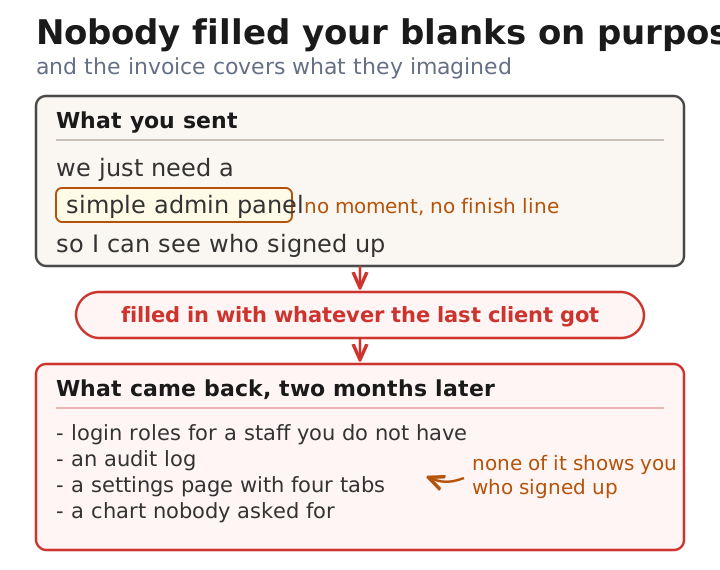
This is usually the moment you start wondering whether the shop is milking you. Usually they aren’t: an over-engineered MVP - MVP meaning minimum viable product, the first small version of your app - is the default result of a vague request, because the blank spaces in your spec (the written description of what to build) get filled by someone else’s imagination, and you pay for what they imagined.
You can fix this from your side of the table, without learning to code. There’s a fifteen-minute check you can run tonight on the last thing you sent your team, and a rewrite that takes about ninety minutes before your next request goes out.
Why vague requests come back bigger #
A developer reading “simple admin panel” has to decide what those four words mean, and the reference points in their head are the admin panels they’ve already seen: Stripe’s dashboard, Shopify’s back office, whatever the last client got. AI coding tools do the same thing for the same reason - they’re trained on the busiest big-company version of everything, which is part of why AI-built MVPs carry a quality tax. No one at the shop decided to overbuild - they filled your blanks with the defaults already in their heads.
Billing doesn’t push back either. A shop charging by the hour has no reason to talk you out of six extra weeks, and a fixed-price shop quotes the padded version because the padded version is what your four words describe. Founders call the result dev shop scope creep - before you send the angry email, check whether the scope was ever written down at all, a check that pairs well with the questions to ask a dev shop before signing.
Our developers have the same instinct, honestly - builders like building the complete version of things, and a good spec exists to override that, theirs and ours.
The document that closes those blanks is a one-page product brief: who the user is, the one problem, the one workflow you’re building, one success metric, and a written list of what you are NOT building. We teach the exact format as a free course lesson, The One-Page Product Brief, and the rest of this post is about the part of that page where spaceships are born.
The feature-noun check: fifteen minutes, tonight #
Open the last thing you sent your team about what to build - an email, a Google doc, or a ticket (a work item in a tracker like Jira or Trello). Mark every line that names a piece of software: “dashboard,” “user roles,” “export button,” “notifications.” Those are feature nouns.
Now look for a line that names a moment in your week and the result you needed from it. Something shaped like: “on Monday I need last week’s signups so I can write the investor update.”
If every line is a noun and no line is a moment, the overbuild was locked in before the shop ever produced an estimate, because what they estimated was their own mental picture of your nouns. The ratio matters more than the total. Ten nouns and zero moments means the builder chose everything that actually matters about your product.
That’s the whole check - you don’t need access to the code, and nobody has to know you ran it.
Job stories vs user stories: why the standard format doesn’t save you #
If you’ve worked with an agency before, you may have seen requirements written as user stories - a fill-in-the-blanks format (documented by Mountain Goat Software) that reads: “As an admin, I want an admin panel, so that I can manage users.” It looks structured. But the middle slot still holds a feature noun, so it constrains nothing - “an admin panel” invites the same spaceship, now wrapped in ceremony.
Job stories, a format Alan Klement proposed and Intercom wrote about using to design features, swap the role for a situation: When [situation], I want to [action], so I can [outcome].
Here’s the same request written both ways:
User story: “As an admin, I want an admin panel, so that I can manage users.”
Job story: “When I open my laptop on Monday, I want to see how many people signed up last week and their emails, so I can send the investor update in ten minutes.”
A developer can quote six weeks against the first version in complete good faith. The second version describes one page with a number and a list on it, and anyone reading it can see that an audit log does nothing to help you send Monday’s update.
Every slot in that sentence is doing scope-control work. “Monday” says this happens weekly, so nobody builds live charts that update by the second; “ten minutes” is a budget; “the investor update” is a finish line the builder can hold each suggestion against and cut what doesn’t serve it.
What the rewrite costs you #
Writing outcomes is slower than listing features. Budget ninety minutes for one page rather than five, and expect the first attempt to feel awkward - naming the actual moment you need something forces you to admit which features you wanted just because competitors have them.
Some unrequested work is also legitimately necessary. Password resets, database backups, and keeping the login secure will never appear in your job stories, so don’t treat every line item you didn’t ask for as padding. Ask “which outcome does this serve?” and a straight shop answers in one sentence: “if the database dies without a backup, there is no Monday signup list.” A shop that repeatedly can’t connect its line items to your outcomes belongs on the red-flags checklist.
Job stories also fit product work better than exploration. When you genuinely don’t know what you want yet, say so and buy a small fixed-length experiment instead of writing a spec - Basecamp’s Shape Up calls this fixing the appetite (a fixed time budget) and letting scope flex. Cutting a feature now doesn’t ban it forever, either; Martin Fowler’s YAGNI essay (YAGNI is short for “you aren’t gonna need it”) lays out why adding something later, when you need it, is usually cheaper than carrying it from day one.
The 90-minute rewrite before your next request #
Before the next thing you hand your team, block one long coffee and do three things.
First, fill in the one-page brief - the template is a free copy-paste page with the five sections, including the “NOT building” list that kills the most expensive guesses outright.
Second, rewrite every feature noun in the “what you’re building” section as a job story. Lesson 3.2 of the course - features to outcomes walks the rewrite with worked examples; it’s the quality gate built for exactly the spaceship problem, and it takes about twenty minutes on a drafted brief.
Third, test the brief before sending it to a human. Paste it into Claude or ChatGPT and ask: “name five things you would build from this that I didn’t list.” If the answer names things you don’t want, your brief still has blanks - tighten the loosest line and run it again.
You don’t have to switch shops to try any of this - the change is in the next spec you send. If you hand the same team a page with no blank spaces and the spaceship still shows up, that’s a different problem, and there’s a separate guide for that conversation.
At JetThoughts we’ve been building Ruby on Rails apps (the web framework we work in) since 2008, and a steady share of that work is taking over projects where the spaceship already landed. Need engineers for this? See how we work.
