Template companion to The Friday Demo Rule. Send to your team Monday. Run Friday at 4pm.
A 15-minute Friday script that catches fake progress before it costs you a sprint.
By Friday of week 4 you will know whether your dev team is shipping or stalling. You will not have read a line of code. You will have watched four short demos and clicked four staging URLs. That is the entire system.
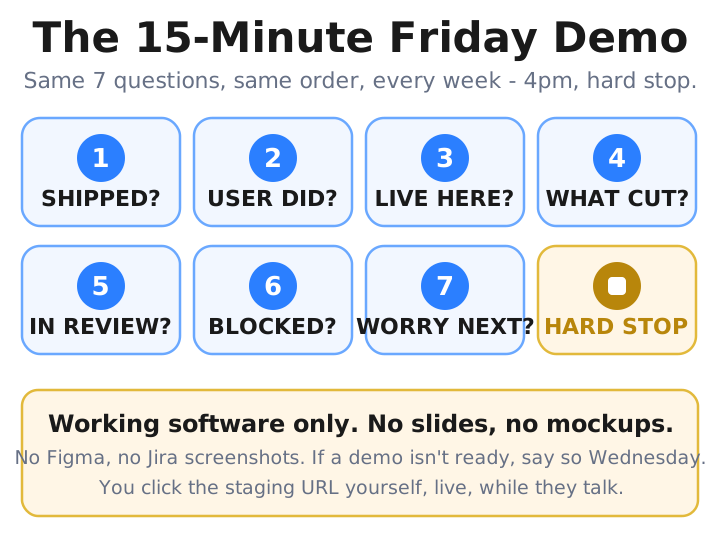
7 questions, asked in order: (1) What shipped? (2) What did the user do? (3) Where is it live for me? (4) What did we cut? (5) What’s in review? (6) What’s blocked? (7) What should I worry about next week?
Why this exists #
Jira closing nine tickets in a week tells you cards moved, not that anything works. A feature can sit “behind a feature flag” for three weeks, throw a 500 on every click, and still show up as closed tickets and a confident status update - four months and $54K into a six-week MVP - because no one on the call has to open it in front of you. The seven questions above force that open. Asked in order, they turn a status call into four demos and four staging URLs you click yourself: what shipped, what the user can now do, where it is live for you, and what got cut to make room.
How to use it #
Send the template to your team Monday morning, no debate. Frame it as visibility, not micromanagement: you are asking them to show you one working thing per week.
Run the demo Friday at 4pm. Fifteen minutes, hard stop. Loom (a recorded video) or live screenshare. You attend with one question in your head: “Can I click everything they show me?” Forward every Loom URL to your own inbox the same evening - three weeks of these become your record when the team disputes the timeline.
The template (copy and paste this into Slack on Monday) #
Hey team,
Starting this Friday at 4pm we are running a 15-minute weekly demo. Loom or live screenshare, your choice. Same questions every week so you can plan around it.
Please cover, in this order:
- What shipped this week? Show me the staging URL of one thing I can click. If it is not on staging yet, it does not count as shipped.
- What did the user do? Walk me through the feature as the user touches it. Click the buttons. Submit the form. Show me the success screen and the failure screen.
- Where is it live for me? Send me the URL and the test login in the same message. I should be able to repeat your demo from my laptop within five minutes.
- What did we cut to ship that? Tell me what you simplified, removed, or postponed. If nothing was cut, the scope was probably wrong or the work is not done.
- What is in review but not shipped? Show me the open pull request and tell me who reviewed it. If nobody reviewed it, say so.
- What is blocked, and on whom? Name the person, the answer you need from me, and the deadline you need it by.
- What is the one thing I should worry about for next week? Not a status update. The actual thing keeping you up at night.
Hard rules: 15 minutes total, recorded if it is Loom, no slides, no Figma mockups, no Jira screenshots. Working software only. If a demo is not ready, say so on Wednesday so we can replan.
Thanks, [Your name]
Do not soften it. Do not add “if you have time” or “would be nice to”. The team will respect the hard structure more than a polite request they can ignore.
What good looks like vs. what bad looks like #
Q1 - what shipped this week?
Bad: “We finished the Stripe integration.”
Good: “Live at staging.app/checkout. Here is a $1 test transaction I just ran. The webhook fired, the order moved to paid, the receipt landed in your inbox.”
Bad answers describe completion as a feeling. Good answers point at evidence and walk you to it.
Q3 - where is it live for me?
Bad: “I will send you a Loom of it after the demo.”
Good: “staging.acme.app/dashboard. Login:
demo@example.com / example-pass-123.”
You should be able to click the thing yourself within five minutes. If you cannot, you do not have admin access, the staging environment does not exist, or the feature is not actually deployed. All three are emergencies.
Q4 - what did we cut to ship that?
Bad: “Nothing, we built everything in the spec.”
Good: “We cut the admin override screen. You will not be able to edit a user’s plan from the dashboard until next sprint. Manual fix is to email me, takes me three minutes.”
This is the over-engineering check. If your team never cuts anything, they are either building twice as much as needed or they are lying about what is done.
Q5 - what is in review but not shipped?
Bad: “A few things are in PR, I can send you the list later.”
Good: “PR #843 - admin search. Priya reviewing since Tuesday, two changes requested, waiting on author. PR #851 - signup rate limiting. No reviewer yet because Priya is on PTO Thu-Fri; will assign Monday.”
If the same name keeps appearing as the only reviewer, you have a single point of failure - the JetThoughts red-flags checklist calls this bus factor of one.
Three things to do during the call #
- Click the staging URL while they are talking. Open it on your laptop the moment they share it. If you get a 500, a login error, or “this page can’t be reached”, interrupt and ask. Do not wait until Monday to find out the URL was a screenshot.
- Ask one follow-up per question. Not three. If your follow-up gets a paragraph of jargon back, that is information. Save it for next time.
- Write down one number per demo. “PR #849”, “$1 transaction”, “47 paying users on the new flow”. Three months of one-number receipts beat any retrospective the agency will run on themselves.
What to do after the call #
Forward the Loom URL to your own inbox with the date in the subject line. After three months you have a video record nobody on the team controls.
📧 Copy-pasteable follow-up email - forward after each demo:
Subject:
Friday demo - [DATE] - [ONE_LINE_SUMMARY]Forwarding the Loom from today’s demo. [One sentence on what shipped.] [One sentence on what’s blocked.] [One sentence on what’s next.]
Archive for the Friday demo folder.
If a demo gets skipped or rescheduled twice, write a one-line message:
📧 Copy-pasteable ‘skipped twice’ message:
“Friday demo is the one meeting we do not move. Next Friday at 4pm, what will I see?”
Hold the slot.
If you have watched four Fridays and you still cannot click anything from your own laptop, the problem is not the demo format. Read our 8 red flags checklist and start the conversation about access, ownership, and code review.
Built by JetThoughts as part of the From Idea to First Paying Customer curriculum.