In this post
When analyzing data, percentiles help us understand the relative ranking of records within a dataset. In PostgreSQL, we can compute percentiles efficiently using the PERCENT_RANK() OVER window function.
Understanding Percentiles #
The PERCENT_RANK() function calculates the relative rank of a row within a partitioned dataset. The formula used internally is:
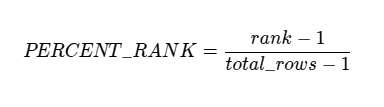
This results in values ranging from 0.0 (for the lowest-ranked row) to 1.0 (for the highest-ranked row), providing a useful measure of distribution.
Example Data Structure #
Let’s assume we have a simple posts table:
CREATE TABLE posts (
    id SERIAL PRIMARY KEY,
    title TEXT NOT NULL,
    body TEXT NOT NULL
);
And for each post we can have multiple comments:
CREATE TABLE comments (
    id SERIAL PRIMARY KEY,
    post_id INT NOT NULL,
    comment_text TEXT NOT NULL
);
And we have visits table, where we keep track of each post visits:
CREATE TABLE visits (
    id SERIAL PRIMARY KEY,
    post_id INT NOT NULL,
    visit_time TIMESTAMP DEFAULT now()
);
The goal is to find out each post performance based on the number of visits/comments compared to all other posts.
Querying Percentiles #
For that we can calculate two separate percentiles for each post:
- Based on the number of comments
- Based on the number of visits
Visits Percentile #
First, we need to calculate number of visits for each post:
SELECT post_id, COUNT(*) AS visit_count
    FROM visits
    GROUP BY post_id
Then we join it with the posts:
SELECT
    p.id,
    p.title,
    COALESCE(vc.visit_count, 0) AS visit_count,
    PERCENT_RANK() OVER (ORDER BY COALESCE(vc.visit_count, 0)) AS visit_percentile
FROM posts p
LEFT JOIN (
SELECT post_id, COUNT(*) AS visit_count
    FROM visits
    GROUP BY post_id
) vc ON p.id = vc.post_id
A few things to note here:
- We use
LEFT JOINbecause some posts might not have visits yet, but we want them to be present in our performance report. - For the same reason we use
COALESCE(vc.visit_count, 0)instead ofvc.visit_count- we want zeros instead ofNULLthere.
The line which calculates the percentile:
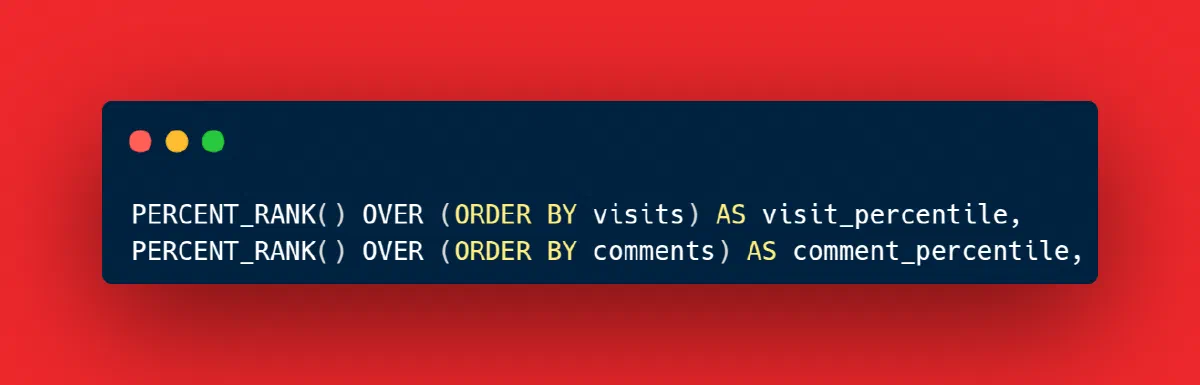
PERCENT_RANK() OVER (ORDER BY COALESCE(vc.visit_count, 0)) AS visit_percentile
Comments Percentile #
To calculate percentile based on the number of comments follows the same pattern: calculate number of comments for each post, join them with posts, and use window function PERCENT_RANK() to get the percentiles.
SELECT post_id, COUNT(*) AS comment_count
    FROM comments
    GROUP BY post_id
We’ll omit the intermediate query and show the final version which returns posts with both percentiles:
SELECT
    p.id,
    p.title,
    COALESCE(vc.visit_count, 0) AS visit_count,
    COALESCE(cc.comment_count, 0) AS comment_count,
    PERCENT_RANK() OVER (ORDER BY COALESCE(vc.visit_count, 0)) AS visit_percentile,
    PERCENT_RANK() OVER (ORDER BY COALESCE(cc.comment_count, 0)) AS comment_percentile,
FROM posts p
LEFT JOIN (
SELECT post_id, COUNT(*) AS visit_count
    FROM visits
    GROUP BY post_id
) vc ON p.id = vc.post_id
LEFT JOIN (
SELECT post_id, COUNT(*) AS comment_count
    FROM comments
    GROUP BY post_id
) cc ON p.id = cc.post_id
Conclusion #
By leveraging PERCENT_RANK(), we can easily determine how each post ranks relative to others based on different metrics. This approach is highly efficient and useful for analytics in PostgreSQL.