Reference companion to Lesson 5.7 · Going Outbound Without a Sales Team - the Product Hunt data, the full tooling stack, domain warmup, the funnel math, filter and personalization detail, all three script variants, the stage cadence, and the no-reply diagnostic. Read the micro-lesson first for the six-stage pipeline and the four-line script; return here when your batch returns no replies and you need the diagnostic.
Why Product Hunt is the wrong lever for a B2B SaaS product #
Product Hunt is one day. Cold outbound is sustained. Sustained motions are what put paying customers on the calendar.
Product Hunt converts at 3.1% (387 launches, OpenHunts 2024). Indie Hackers converts at 23.1% per engaged post. 89% of Product Hunt founders said they’d never launch again. Product Hunt suits developer tools / AI productivity / indie SaaS where buyers read it daily. Your B2B buyer at a 50-500 person company in a specific vertical doesn’t. The 5,000 upvotes are from the wrong people.
The calendar shapes the outcome: Product Hunt is one day, Indie Hackers is sustained engagement, filtered cold outbound is recurring 30-message batches until you have a funnel. Founders shortcutting to one-day launches keep being surprised leads don’t show up the next morning. The question is not “which big launch.” It is “which 50 named buyers should hear from me first.”
Product Hunt converted at 3.1% per launch event across 387 launches OpenHunts studied in 2024. Indie Hackers - posts written as engagement rather than launch announcements - converted at 23.1% per engaged post over the same period. 89% of the Product Hunt founders OpenHunts surveyed said they would not launch on the platform again (OpenHunts launch statistics). Product Hunt is not bad; it is a one-day event in a job that needs sustained motion over a quarter.
Figma’s first customer 11-20 cohort reportedly came from cold DMs to influential designers; Retool reportedly filtered Crunchbase by funding recency. Your Rails MVP customer 11-20 cohort will come from LinkedIn Sales Navigator (LinkedIn’s paid search tool for filtering buyers by job title, company size, and industry) or Apollo, or both, feeding the four-line script.
The tooling stack #
You run the whole pipeline in six stages with off-the-shelf tools - no engineer, no $1,200/month sales stack, no Salesforce.
The tooling is a volume choice, and both versions ship the same 30-message batch.
| Stack | What it is | What it costs |
|---|---|---|
| $0 | Apollo’s free tier (a B2B contact database that finds prospects’ names and work emails; the free tier is credit-based - check the current allowance), a Google Sheet, a Gmail mail-merge add-on (sends one email to many recipients, free), Loom, and Calendly. Covers every stage. | Your time - you enrich the list by hand in the sheet |
| Paid | Swaps manual enrichment for automation through Smartlead or Apollo’s paid tiers | Money. Pays off once you’re sending 100+ messages a week and hand-enrichment is the bottleneck |
At this 30-message volume either works. Pick by whether your scarcer resource is hours or dollars.
The five tools and their 2026 pricing:
| Tool | Role | Price |
|---|---|---|
| LinkedIn Sales Navigator | Filter buyers by title, company size, funding signal, role tenure | Paid single-user plans - check LinkedIn pricing |
| Apollo.io (Starter / free tier) | Cheaper alternative to Sales Nav for B2B email + filters | Free tier available; paid plans for scale |
| Loom | 90s product walkthrough + you on camera | Free tier available |
| Calendly | 15-min demo booking, auto-confirm | Free tier supports one event type |
| Stripe Invoice | Pilot deposit, no monthly fee | Per-transaction card fee, no monthly cost - Stripe pricing |
You can ship the entire pipeline for under $100/month if you use Apollo’s free tier and skip Sales Navigator.
The trade-off: Sales Navigator’s filters are richer for enterprise buyer profiles (especially for filtering on “joined company in last 90 days” or “recent leadership change”), and Apollo’s free tier has limited credits. If your buyer is a 50-200 person company contact in a specific industry, Apollo free tier is enough. If your buyer is a recent VP hire at a 500-2,000 person company, Sales Navigator pays for itself in week 1.
Pre-flight: warm your sending domain BEFORE batch 1. A brand-new sending domain (e.g.,
yourcompany.comregistered last week, no email history) will land in spam on batch 1 even with a perfect ICP list and a sharp script. The fix is either:
- Use LinkedIn DM for batch 1. No domain warmup required. Sales Navigator + 30 personalized DMs gets the same reach as cold email for a B2B founder, and the messages reliably deliver.
- OR warm the domain for 2-3 weeks first. Use a tool like Mailwarm or Smartlead’s warmup (the same Smartlead from the tooling choice above) to send 5-10 low-volume reply-conversation emails per day to seed positive sender reputation. After 2-3 weeks of warmup, send batch 1 from the same domain.
Skip this step and the <5% reply-rate diagnostic below tells you “domain rep is dead” - because the domain never had reputation in the first place. The mechanical cause of your 0 replies is the domain, not the ICP filter or the script.
Volume targets and what to expect #
Running outbound long enough to read the funnel, 100-200 outreach contacts produces 5-10 paying customers. The funnel at each stage:
| Stage | Target |
|---|---|
| Raw list pulled | 100-200 names |
| Sent (after filter) | 30-message minimum per batch, several batches |
| Reply rate | ≥5% (below 5% = stop and diagnose) |
| Demo-to-paid | ≥20% of demos taken |
| Paid pilots landed | 5-10 from 100-200 outreach |
A 10% reply rate on 30 messages is 3 replies. At 20% demo-to-paid, 3 demos lands 0-1 pilots per batch - consistent with the multi-batch model. The numbers are not impressive individually; they compound across batches.
Filter: getting to 30 high-fit names #
Apollo or Sales Navigator. Filter on the six dimensions you defined in Lesson 2.3 · Where to Look - the same filter you saved as the Module 5 cold seed tab in your Lesson 2.3-2.4 outreach spreadsheet: job title (the buyer or the user, pick one), company size (start one tight band), industry (one vertical first), geography (one timezone for callable demos), technology used (filter for tools your product replaces or integrates with), recent funding or hiring signal (companies with momentum reply faster).
Pull 100-150 raw rows. Strip three categories before sending:
- Anyone whose company size or title is one band off your ICP. The 80% match is not the 100% match.
- Anyone whose LinkedIn shows no posting activity in the last 12 months. They will not see your DM.
- Anyone whose company you have a competing product alignment with (you sell to their competitor). A B2B services founder lost a great lead this way and had to wait two quarters for the lead’s company to pivot before reaching out again.
You should be left with 30-50 clean names. Hold the bottom 20 for a later batch and send the top 30 in the first batch.
Apollo free-tier reality. Apollo’s free tier is credit-based (a small monthly allowance of email and export credits). The “pull 100-150 raw rows” instruction usually exceeds one month of free credits, so either spread it over time OR use LinkedIn DM for batch 1 and reserve Apollo exports for batch 2+. Recommended sequence for free-tier founders: (1) build batch 1 from your existing LinkedIn 1st-degree connections + Sales Navigator trial (free for 1 month, no Apollo needed); (2) start Apollo on month 2 with the credits dripping in over time; (3) upgrade to a paid Apollo tier only when you have a working reply-rate signal that justifies the spend.
Personalize: 60-90 seconds per name, not 10 minutes #
The mistake founders make on the first batch is over-personalizing. Twenty minutes of LinkedIn research per prospect turns into a 400-word email with five quoted lines from their feed, and response rates fall off a cliff above the four-line threshold.
The right level of personalization is one specific reference per message: scan the last three posts and the recent role, find one specific thing (a post, a comment, a hiring milestone, a recent promotion). One sentence. Then the same four-line script for everyone.
The 60-90 second rule keeps the volume tractable. 30 prospects × 90 seconds = 45 minutes of personalization per send. A founder can do that in one focused sitting.
Advanced: Loom video audit (higher conversion, higher effort). Instead of a text-based cold message, record a 10-minute Loom video showing the prospect’s specific pain point on THEIR website or in THEIR public product, then demonstrate how your MVP solves it. Send directly to the decision-maker via LinkedIn DM or email. Conversion is significantly higher than cold text because the video proves you did the work rather than claiming you did. The trade-off: each video takes 10-15 minutes to record and upload vs 60-90 seconds for a text personalization. Use this for your 5 highest-value prospects per batch, not all 30. The same product Loom from stage 3 of the pipeline works for the demo portion; only the first 2-3 minutes (showing their specific pain point) is custom per prospect.
The 4-line cold-email script (all 3 variants) #
The lesson carries the B2B SaaS variant. Here are all three - each follows the same shape: a specific reference earns the open, one sentence on what you built, one specific ask with friction removed, one currency anchor. Total length: 4-6 lines including subject.
Variant 1: B2B SaaS, shipped-MVP context #
Subject: shipped MVP last month - your post on [topic]

Hi [first name],

Saw your post on [topic, paraphrased in their words] last [Tuesday]. I shipped my MVP for [the same problem] last month using [Lovable + Supabase + Stripe] after 10 interviews with people who flagged the exact issue you described. I built [a tool that does X for Y].

Worth 15 minutes to walk through? Paid design partner spots, [$ deposit] credited toward year one. Calendly: [link]

[Your name]
Variant 2: B2B services #
Subject: noticed your hiring for [role]

Hi [first name],

Saw [Company] is hiring a [role] - guessing [the problem the role solves] is on your roadmap. I run a [services category] practice and we have helped [a comparable company size] handle [the same problem] in [the same vertical] in the last six months.

Open to a 15-minute walk-through? Paid pilot model, [$ deposit] credited toward year-one engagement. Calendly: [link]

[Your name]
Variant 3: B2C app #
Subject: re: your [Reddit post / TikTok video] on [topic]

Hi [first name],

Your [Reddit post / TikTok video] on [topic] hit. I built an app that handles [the painful task you described] - the link below is a 90-second Loom showing it work end-to-end on my phone.

Loom: [link]. App: [link]. If it looks useful, I am opening 20 paid beta spots at $9/month for the first month. Reply to claim one.

[Your name]
Stage-by-stage cadence #
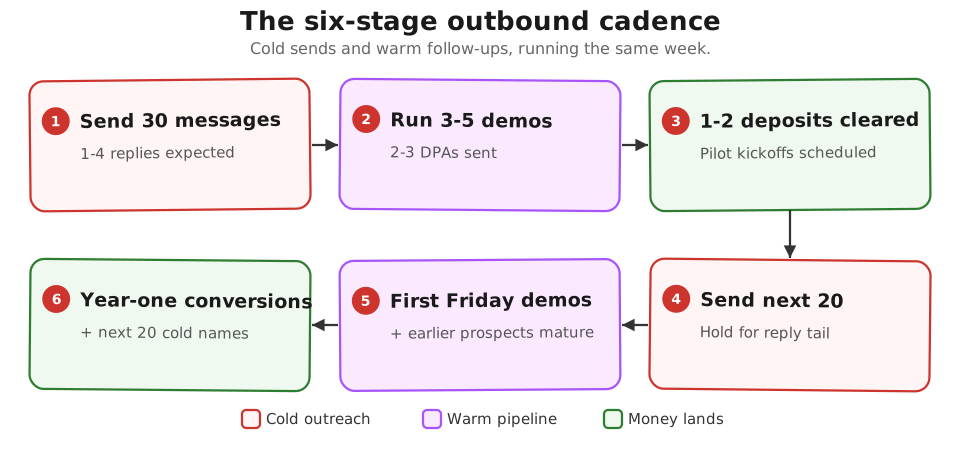
The 30-message batch is not a one-time event. Run fresh 30-message batches until you have 20 customers. The second and third batches will outperform the first by 30-50% because you will have learned which reference patterns earn replies and which do not.
What “no reply” actually means #
First-batch reality before the diagnostic. If your first 30-message batch returns 0-1 replies, your first reaction will be “the product is bad” or “my message is generic.” Both of those CAN be true, but the more common cause for a brand-new founder with a new sending domain is mechanical: the messages did not deliver, or the domain has no warmup history yet, or the personalization felt fake despite being real.
A 0-1 reply rate on batch 1 is the median outcome for first-time cold senders, not a failure signal. Walk the 3-item diagnostic below before you change the message, the price, or the product.
A 30-message batch with zero replies is rare and almost always indicates a filter problem, not a script problem. Check three things:
Did the messages deliver? If you are using cold email (vs LinkedIn DM), check your sending tool’s bounce rate. Above 10% bounce means your list is dirty and your domain reputation is suffering. Pause sending and re-warm the inbox before continuing.
Is the filter right? Re-read three random LinkedIn profiles from your sent list. If you cannot imagine the person reading the message and finding it relevant, your ICP filter is off. The fix is upstream of the script.
Is the reference real? Look at the first paragraph of your last 10 sent messages. If the “specific reference” sentence sounds generic (“noticed you work at [Company] in [ROLE]”), it was not specific enough. Real specificity means the prospect can verify the claim - a date, a post title, a name, an event.
Compounding past customer 20 #
Ask your first 20 for one introduction each. That feeds enough warm leads to stop scaling cold outbound past the current batch size.
Customers 11-20 come from filtered cold outbound. Customers 21-50 come from referrals out of customers 1-20. If your first 20 were chosen carefully (must-have segment, personal network + filtered outbound), each knows two more in the same segment.
The motion is asking for one introduction each. Script at the end of every Friday demo once the cadence is established: “If this is useful for you, do you know one or two others I should be talking to?”
Half say yes. Half of those actually send the intro. A steady drip of warm leads from a 20-customer base is enough to keep cold outbound steady rather than scaling the batch size.
Advanced (optional sidebar) #
The main path gets you from customer 11 to customer 20. Two upgrades matter after that:
After 5-10 paid pilots from cold outbound, layer on sales-system rigor: First Round Review’s sales article collection and the Y Combinator library on founder-led sales.
Past customer 30, the solo-founder playbooks give way to operator manuals: Mark Roberge’s The Sales Acceleration Formula for hiring your first AE (account executive - a dedicated salesperson), Mike Weinberg’s New Sales. Simplified. for the manager handbook.
Going further (after your first paying customer) #
You’ve completed the core 5-module course - hypothesis, smoke test + price, problem validation + prototype, brief + build, first paid pilot. Continuation chapters apply once you’ve signed your first paid pilot:
| Symptom | Continuation chapter |
|---|---|
| Customers leaving in week 2-4 | Churn Triage Before Acquisition - fix retention before spending on more outbound |
| Key metric flat for 2+ months | Pivot or Persevere - decision framework for the next move |
| Hit the self-serve ceiling | Hire Track Supplementary Reference - when to hire and what to look for |
| Product touches AI in production | Agency AI Questions, AI Token Bill, Slopsquatting - AI-era hygiene |
Further reading #
- Lenny Rachitsky, How to win your first 10 B2B customers - the 7-step playbook from 100+ B2B founders, including the cold-outbound section.
- Paul Graham, Do Things That Don’t Scale - the foundational text on manual customer recruitment, including the Stripe Collison-brothers cold-DM-and-install motion.
Built by JetThoughts as a companion reference to the From Idea to First Paying Customer free curriculum.